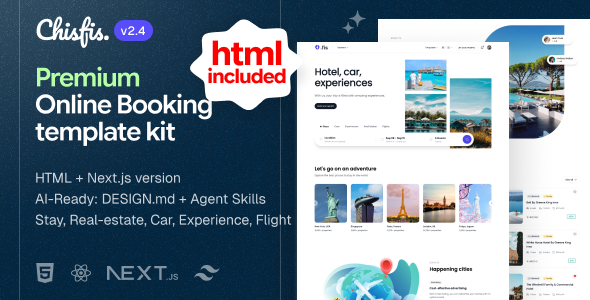
Chisfis 2.4.0, 26 October 2026
New: the download now includes an HTML version of Chisfis,
in its own html/ folder beside the Next.js template.
Same pages, same interactions, as plain .html files built
with Vite, Tailwind CSS 4 and Alpine.js, with no front-end framework
and no server. It has its own guide, and one licence sheet covers both.
Also in 2.4.0:
-
Search, filters and bookings carry through: the results page reads
the search and the filters from the address, and the listing page,
checkout and the confirmation quote the same total. - A booking bar fixed to the bottom of every listing page on phones.
- Add listing keeps a draft across its ten steps and previews your card.
- Real estate: book a viewing, a mortgage calculator, an enquiry form.
- One wishlist for the whole site, and six currencies that switch every price.
-
Demo content per listing: own description, photos and host, in four cities,
with dates that count from today, and a travel blog written by the hosts. - A canonical address, share image and share title on every page.
-
Photographs load at the width they are drawn: the home page drops from
6.9 MB to 0.8 MB of photos. - A keyboard focus ring on buttons and links, and dialogs above the header.
Updating a customised copy? A few files were renamed and the demo data was
rewritten; the changelog lists them.
One template, five things to book, in two versions
Chisfis is a booking front end for stays, experiences, car rental, flights and real estate. The five verticals share one design system, so a property card, a car card and a flight row read as the same product. It comes as a Next.js 16 app and as the same pages in plain HTML, in one download.
The Next.js version prerenders 197 pages at build time. There is no backend, no database and no service to sign up for: the demo content is plain TypeScript arrays you can edit in any text editor, and the site deploys anywhere that serves static files.
AI ready
Open the download in Cursor, Copilot, Codex or Claude Code and the agent already knows the project.
- DESIGN.md in
template/is the design language: the colour scales, fonts and corner radius, and the rules for using them, so new pages look like the rest. - AGENTS.md in
template/sets out the stack, the folder layout and the conventions an edit can break without a warning, such as the image wrapper and the static route rules. - build-page adds a page, section or component in the template’s own design language.
- restyle changes the brand colour, fonts, corner radius, motion, opening mode or reading direction.
- review-design checks a change against DESIGN.md before you commit it.
- AGENTS.md in
html/explains how its pages, partials, scripts and data fit together and which edits break them.
Two versions, one download
template/ is the Next.js version, with the stack listed below. html/ is the same pages as plain HTML5, styled with Tailwind CSS 4.3, made interactive with Alpine.js 3 and built with Vite 7. It has no front-end framework and no server.
- The HTML pages were captured from the Next.js build, so the markup, the copy and the look match at desktop and at phone width.
- 45 pages: 29 fixed pages, plus 16 samples of the pages that change with what they show. Every card and link that leads to a listing, an article, an author or a category opens its sample, so the sample is the page to restyle.
- The finished site is already built in
html/dist/and opens straight from the folder. A browser blocks maps onfile://, so serve it from any web server to see them. - To edit it you need Node.js 20.19 or newer and npm.
npm run buildwrites the site again. - Pages share 33 Handlebars partials, so a change to the header or footer reaches every page.
- Search, filters, booking, checkout, add listing, the wishlist and the currency menu all work as they do in the Next.js version.
Every route in the Next.js version
- Two stay landing pages, the second with a different hero treatment.
- A landing page per vertical for experiences, car rental and real estate, each with its own search form.
- Category pages in a grid with filtered listings for all five verticals.
- Category pages beside a map, the same results with a live map that tracks the list.
- Listing detail pages with gallery, amenities, host, reviews, a location map and a booking panel, per vertical.
- Host profiles with listings across four verticals in tabs.
- Blog index and article, with nine travel articles written by the demo hosts and a working comment form.
- A ten-step add-listing flow with a progress bar, a draft that survives Back and reload, and a preview of your card.
- Checkout and confirmation with a trip you can change in place, a price breakdown, and the receipt that repeats the booking. Flights have a checkout of their own.
- Account area with profile, password, payments and saved listings.
- Auth screens for log in, sign up and forgot password.
- About, contact and a pricing table.
What is actually built
Every control in the demo does something.
- Search that reaches the results. Place, dates and guests travel in the address, narrow the listings, and show again in the header. A filtered page survives a reload and can be shared.
- Bookings that agree. Reserve carries the listing, dates and guests to checkout and on to the confirmation, and all three quote the same total.
- A booking bar on phones with the price and Reserve, fixed to the bottom of every listing page.
- Book a viewing on property pages, in person or by video call, with a calendar file to add it to your own calendar.
- Mortgage and moving-in calculators for real estate, plus an enquiry form to the agent.
- Date range pickers that open on a future date, refuse to page into the past, and strike through days you cannot choose.
- Guest counters for adults, children and infants, wired through to the search summary.
- Location search with suggestions and recent searches.
- A price range slider and filter panels per vertical.
- Six currencies that rewrite every price, map pin and total.
- Maps built on MapLibre with CARTO basemaps: a category map that syncs with the list, and a location map on every listing.
- One wishlist for the whole site, with a saved-listings page behind it.
- Share, using the operating system share sheet where there is one and the clipboard where there is not.
- Review and comment forms that post into the list in front of you.
- Photo galleries with a lightbox and keyboard navigation.
- Dark mode and a right-to-left layout, both from the Customize panel.
Built to stay fast
- Every page is generated at build time. No page waits on a server to render.
- Photographs load at the width they are drawn: the home page loads 0.8 MB of photos where it used to load 6.9 MB.
- The date picker is 170 KB and loads when you open it, not before.
- The map loads when you scroll to it, not before.
- Every page names its own canonical address and carries a share image and a share title.
npm run check:linkschecks every internal link in the built pages against the routes the build produced, and fails on a mismatch.
Stack
Next.js version:
- Next.js 16.3.5, App Router
- React 19.3.0, TypeScript 5.9
- Tailwind CSS 4.3.3
- Headless UI 2 and Radix UI
- MapLibre GL 6 with CARTO basemaps
- Embla carousel, react-datepicker, date-fns
- Google Sans Flex for body text and Poppins for headings, via
next/font, downloaded at build and served from your own domain with no setup step
HTML version:
- HTML5 pages with Handlebars partials
- Tailwind CSS 4.3, built with Vite 7
- Alpine.js 3.17
- Embla Carousel 8.6 and MapLibre GL JS 6.10
- Poppins, bundled in
html/src/assets/fonts/
What is not included
Said plainly, so there are no surprises after purchase:
- No backend. Forms, likes, filters and checkout run on local state in both versions. Each one names the function or the address to replace when you connect a real API.
- The photography is not yours. It is loaded from Pexels and Unsplash so the template looks like the preview on first run. Replace it with imagery you own.
- Map tiles come from CARTO at runtime. For a production site, consider your own tile provider.
- The demo logos are real company marks, shown to demonstrate the layout. Swap or remove them before launch.
- The HTML version has no sitemap or robots file. Add both to its
public/folder before you launch. - A few details differ in the HTML version: maps stay on their loading dots when a page is opened from a folder, menus and dialogs do not close with a swipe, and a link is a full page load. The guide in
documentation/html.htmllists each one.
Download Now
LIVE PREVIEWBUY FOR $39