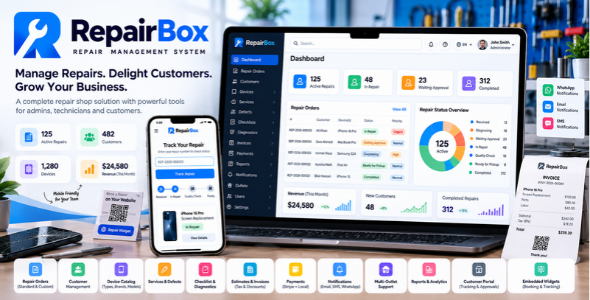
RepairBox – Complete Repair Management System
Manage Repairs. Delight Customers. Grow Your Business.
RepairBox is a modern, all-in-one Repair Management System designed for mobile phone repair shops, computer service centers, electronics repair businesses, independent technicians, and multi-outlet repair companies.
Manage your repair operations from one centralized platform. Organize customer registration, repair booking, multiple devices per order, technician assignments, diagnosis, estimates, customer approvals, quality control, invoicing, payments, notifications, and repair completion.
Production-Ready Web Application
It is a production-ready, single-page web application (SPA) designed for installation on live web servers, including professional shared hosting environments.
With dedicated Admin and Workshop portals, customer-facing functionality, configurable repair workflows, billing tools, reporting, notifications, and website integration options, RepairBox helps businesses organize their operations and maintain a clear history of every repair.
Why Choose RepairBox?
| Feature | What It Offers |
|---|---|
| Repair Management | Manage Repair Orders, multiple devices, repair progress, diagnosis, and completion. |
| Dedicated Portals | Separate Admin and Workshop experiences for administration and repair processing. |
| Customer Management | Maintain customer profiles, contact information, addresses, and repair history. |
| Workshop Workflow | Organize technician assignments, diagnostic findings, checklists, notes, and quality control. |
| Billing and Payments | Manage estimates, invoices, taxes, discounts, payment records, and supported refunds. |
| Customer Communication | Configure supported email, SMS, and WhatsApp notification integrations. |
| Website Integration | Explore available repair booking and public tracking widgets. |
| Multi-Outlet Operations | Organize repair records and staff access across supported business locations. |
| Access Control | Manage users, roles, and permissions according to staff responsibilities. |
| Reports and Integrations | Access available reporting tools and documented integration capabilities. |
Get RepairBox at a 10% Discount
Ready to purchase RepairBox?
Purchase RepairBox through our official Gumroad listing at a 10% discounted price.
Need a Customized Version?
Every repair business has its own requirements. If you need RepairBox adapted to your business workflow or specific requirements, contact us to discuss a customized version.
Email: info.codehas@gmail.com
Please describe the features or changes you need so we can discuss your customization requirements.
Live Demo
Explore RepairBox before making your purchase. Visit the live demo to review the available portals and experience the repair-management interface.
Live Demo Website: https://repairbox.codehas.net/
| Portal | Demo Link | Username | Password |
|---|---|---|---|
| Admin Portal | Open Admin Portal | admin@admin.com | 12345678 |
| Workshop Portal | Open Workshop Portal | user@user.com | 12345678 |
Demo Guide: Read the Live Demo Instructions
Important: The demo environment is shared and may be reset. Do not enter real customer information, passwords, payment details, or other sensitive data. Demo credentials and available features may change.
Feature Overview
RepairBox brings repair operations, customer records, workshop processing, billing, and communication into one organized application.
| Category | Included Functionality |
|---|---|
| Repair Management | Repair Orders, multiple devices, repair statuses, priorities, history, and activity records. |
| Device Catalog | Device types, brands, models, services, defects, and supported CSV catalog tools. |
| Workshop | Technician assignments, diagnosis, notes, checklists, and quality control. |
| Customer Experience | Customer portal, supported booking and tracking experiences, and notification settings. |
| Billing | Estimates, approvals, invoices, numbering, taxes, VAT, discounts, and coupons. |
| Payments | Payment records, supported payment methods, Stripe integration, and refunds where available. |
| Administration | Users, roles, permissions, outlets, settings, and reports. |
| Integrations | Supported email, SMS, and WhatsApp configuration, API authentication, and webhook guidance. |
Detailed Features
1. Complete Repair Order Management
Manage repair requests from initial intake through workshop processing and completion.
- Create and manage Repair Orders with human-readable references.
- Associate repair orders with customers and outlets.
- Add multiple devices to a single Repair Order.
- Track individual Repair Items independently.
- Record reported problems, device condition, accessories, notes, and supported attachments.
- Manage repair statuses and priorities.
- Maintain repair history and activity records.
- Organize diagnosis, repair, quality control, billing, and completion.
Documentation: Repair Management Guide
2. Multiple Devices per Repair Order
Handle several devices belonging to the same customer under one Repair Order while retaining separate device details and progress.
For example, a customer can submit an iPhone for screen replacement and a laptop for battery diagnosis under the same order. Each device can maintain its own repair information and status.
- Independent device details and reported problems.
- Device-specific services and defects.
- Technician assignments where supported.
- Separate diagnostic findings and technician notes.
- Checklists and quality-control progress.
- Individual repair statuses and history.
Documentation: Adding Multiple Devices
3. Standard and Custom Repair Intake
Standard / Catalog-Based Repairs
Use the structured workflow:
Device Type → Brand → Device / Model → Services and Defects
This approach helps staff select existing catalog records and maintain consistent repair information.
Custom / Manual Repairs
When a device is missing from the catalog, staff can enter the available details manually.
- Device type, brand, and model.
- Reported problem and requested service.
- Additional notes.
Custom repair information stays associated with the repair record and does not automatically become shared catalog data.
Documentation: Standard vs. Custom Repairs
4. Device Catalog Management
- Manage device types, brands, devices, and models.
- Maintain repair services and defects.
- Configure device-to-service relationships.
- Configure device-to-defect relationships.
- Maintain consistent catalog organization.
- Use CSV catalog import/export through the available catalog tools.
Documentation: Device Catalog Guide
5. Customer Management
- Customer registration and profiles.
- Primary and secondary email and phone information.
- Contact preferences and preferred language where supported.
- Individual and business customer information.
- Company and tax information where maintained.
- Multiple customer addresses and billing information.
- Customer repair history.
Organized customer records help staff manage repeat business and maintain a clear service history.
Admin and Workshop Portals
6. Dedicated Admin Portal
Manage business operations through a centralized administrative interface.
- Dashboard and repair overview.
- Repair Orders and Customers.
- Device Catalog, Services, and Defects.
- Repair Statuses and Priorities.
- Checklists, Diagnostics, and Canned Replies.
- User Management, Roles, and Permissions.
- Business and Outlet Management.
- Estimates, Invoices, and Invoice Numbering.
- Payments, Refunds, Discounts, and Coupons.
- Tax and VAT Settings.
- Notification Settings, Reports, and General Settings.
Available functions depend on user permissions and application configuration.
7. Dedicated Workshop Portal
Give technicians and workshop staff a focused workspace for repair processing.
- Workshop dashboard and assigned repairs.
- Workload and technician assignments.
- Diagnosis and repair notes.
- Checklists and status updates.
- Repair history.
- Reassignment where permitted.
- Quality control and workshop handover.
Documentation: Workshop Guide
8. Technician Assignment and Repair Workflow
- Assign repair work to technicians.
- Maintain device-level responsibility where supported.
- Record diagnostic findings and technician notes.
- Update repair statuses.
- Complete checklists and maintain repair history.
- Reassign repairs where permitted.
- Review outstanding workshop work.
9. Dynamic Statuses and Priorities
Organize repair workflows using configurable statuses and priorities.
Example Repair Statuses:
Received → Awaiting Diagnosis → Diagnosing → Waiting for Approval → Approved → In Repair → Quality Check → Ready for Pickup → Completed
Example Priorities: Low, Normal, Urgent, and Express.
Available settings depend on the installed version and its configuration.
10. Checklists, Diagnostics, and Quality Control
- Maintain repair checklists.
- Record diagnostic findings and repair activities.
- Track inspection results.
- Record quality-control findings.
- Identify items requiring additional attention.
- Verify repaired devices before handover.
- Maintain repair history.
Estimates, Billing, and Payments
11. Estimates and Customer Approvals
- Prepare estimates for repair work.
- Associate estimates with the relevant repair.
- Review proposed services and costs.
- Record approval decisions through the supported workflow.
- Distinguish proposed work from approved work.
- Keep estimates, approval records, and invoices distinct.
12. Invoice Management
- Invoice creation and management.
- Invoice numbering.
- Repair-related charges and totals.
- Outstanding balances.
- Tax and VAT handling.
- Discount and coupon support.
- Payment records and supported refunds.
- Financial reporting.
13. Tax, VAT, Discounts, and Coupons
- Tax and VAT configuration.
- Discount management.
- Coupon functionality.
- Invoice-related tax calculations.
- Repair pricing and billing workflows.
- Financial adjustments where supported.
Verify configured calculations before issuing invoices or accepting live payments.
14. Payment Management and Stripe
- Record customer payments.
- Track outstanding balances and payment status.
- Use configured payment methods.
- Maintain payment and invoice history.
- Manage supported refunds.
- Configure and test the available Stripe integration.
- Verify provider outcomes against RepairBox payment records.
The exact checkout flow and available payment options depend on the installed version and provider configuration.
Documentation: Stripe Integration Guide
Customer Experience and Integrations
15. Customer Portal
- Customer account access.
- Authorized repair records and progress.
- Estimates and approval requests where supported.
- Invoice and payment information where enabled.
- Permitted profile management.
- Available customer notifications.
16. Embedded Repair Booking Widget
Connect your business website with the RepairBox repair intake process using the supported booking widget.
Depending on the deployed version and configuration, the intake flow may include customer information, device selection, services, defects, reported problems, and additional supported booking details.
Documentation: Embedded Repair Booking Widget Guide
17. Public Repair Tracking Widget
Provide customers with a public-facing tracking experience where enabled. Public tracking should expose only information intended for customers and remain separate from staff access.
Documentation: Public Repair Tracking Widget Guide
18. Email, SMS, and WhatsApp Notifications
- Email notification configuration.
- SMS and WhatsApp integration configuration.
- Notification templates.
- Default contact-method settings.
- Customer notification controls.
- Channel-specific configuration and troubleshooting.
Notification delivery depends on the event, active template, recipient details, provider configuration, and application settings. External messaging services may require separate provider accounts and credentials.
Documentation: Notification Settings Guide
19. Canned Replies
Reuse common message content where supported to help staff communicate more consistently and reduce repetitive typing.
20. Multi-Outlet Support
- Associate Repair Orders with outlets.
- Manage staff according to outlet access.
- Maintain outlet-aware operational workflows.
- Support outlet-level reporting where available.
21. Dynamic Roles and Permissions
Control access according to staff responsibilities.
Example Roles: Admin, Manager, Agent, Technician, and Quality Inspector.
Available permission areas include repairs, customers, catalogs, billing, payments, notifications, users, roles, and reports.
22. Dashboard and Reporting
- Operational dashboard and navigation.
- Operational and financial reports.
- Payment and tax reports.
- Audit-related reports where supported.
- Outlet-level filtering where available.
- Report export according to supported features and permissions.
Available metrics, reports, filters, and export formats depend on the installed version and user permissions.
23. API Authentication and Webhooks
RepairBox documentation includes API authentication and webhook-related integration guidance. Available endpoints, authentication options, and event types should be verified against the purchased version and its documentation.
Developer Resources:
24. Internationalization and Responsive Interface
RepairBox’s product requirements include support for international customers and adaptable interfaces.
- Localization requirements.
- Left-to-right and right-to-left interface requirements.
- Light and dark display modes.
- Responsive layout requirements for desktop, tablet, and mobile.
- International customer contact and address information.
Available languages and display options depend on the deployed version and configuration.
25. Business and General Settings
- Business and outlet setup.
- General application settings.
- User and permission management.
- Catalog and workflow settings.
- Notification settings.
- Billing, tax, and reporting settings.
Designed for Different Repair Businesses
| Business Type | How RepairBox Helps |
|---|---|
| Mobile and Tablet Repair | Organize device intake, repair assignments, diagnosis, and completion. |
| Computer and Laptop Repair | Manage customer devices, service requests, estimates, and workshop progress. |
| Electronics and Console Repair | Organize device information, reported problems, services, and repair history. |
| Independent Technicians | Keep customer records and repair activities organized. |
| Multi-Outlet Businesses | Coordinate supported outlet workflows, staff access, and repair records centrally. |
Configure device types, services, defects, statuses, priorities, and permissions to fit your business requirements.
Installation on Live Shared Hosting
RepairBox’s installation documentation focuses on live shared hosting environments using cPanel and the included browser-based installer.
Installation Overview
- Upload and extract the purchased package through cPanel File Manager or FTP.
- Configure the domain or subdomain according to the package instructions.
- Configure the document root to use the application’s
publicdirectory as directed. - Create a MySQL database and user through cPanel.
- Open the included installer through your live domain.
- Enter the requested database details and complete installation.
- Sign in and change the initial account credentials.
- Configure business settings, notifications, and required workflows.
Installation requires compatible hosting, the required PHP extensions, a MySQL database, and the necessary file permissions.
Installation Documentation
Documentation and Resources
Use the following directory to find the relevant RepairBox guide without searching through the entire documentation site.
Getting Started and Setup
| Resource | Description | Link |
|---|---|---|
| Documentation Home | Main RepairBox documentation and navigation. | Open Docs |
| Live Preview | Demo information and portal access. | View Guide |
| Installation and Setup | Live cPanel installation instructions. | View Guide |
| FAQ | Common questions and troubleshooting guidance. | Read FAQ |
| Changelog | Documented release history. | View Changelog |
Repair Management and Workshop
| Resource | Description | Link |
|---|---|---|
| Repair Management | Repair workflow and Repair Order concepts. | View Guide |
| Multiple Devices | Managing several devices under one Repair Order. | View Guide |
| Standard vs. Custom Repairs | Catalog-based and manual repair intake. | View Guide |
| Device Catalog | Device, service, and defect catalog information. | View Guide |
| Workshop Guide | Workshop operations and technician workflow. | View Guide |
Customer Experience and Notifications
| Resource | Description | Link |
|---|---|---|
| Booking Widget | Website repair booking widget guidance. | View Guide |
| Tracking Widget | Public repair tracking guidance. | View Guide |
| Notification Settings | Notification templates and configuration. | View Guide |
Billing, Payments, and Developer Integrations
| Resource | Description | Link |
|---|---|---|
| Stripe Integration | Stripe configuration guidance. | View Guide |
| API Authentication | API authentication documentation. | View Guide |
| Webhooks and Notifications | Webhook and event-notification guidance. | View Guide |
Important Information
- Features and available settings may vary depending on the installed package version.
- External integrations may require separate provider accounts and valid credentials.
- Email, SMS, and WhatsApp delivery depends on supported integrations and correct configuration.
- Online payments require appropriate payment configuration and testing.
- Public widgets and customer-facing pages should be configured and tested before deployment.
- Review the installation guide and FAQ for setup instructions and feature-specific information.
- Verify the package version and its release notes before relying on a particular integration or optional capability.
Ready to Get Started with RepairBox?
Bring customer management, repair booking, workshop operations, billing, payments, and customer communication together in one focused platform.
GET REPAIRBOX AT A 10% DISCOUNT
Purchase RepairBox through our official Gumroad listing.
Need a customized version?
Contact info.codehas@gmail.com to discuss your business requirements.
Live Demo: Open RepairBox Demo
Documentation: Open RepairBox Documentation
RepairBox – Organize repairs. Simplify workshop operations. Deliver a better customer experience.
Download Now
LIVE PREVIEWBUY FOR $159

