Variation Swatches for WooCommerce – Color, Image, Label & Dropdown Swatches
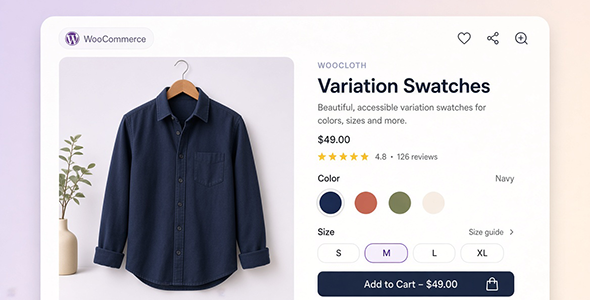
Convert default WooCommerce attribute dropdowns into clean color, image, label/text, button, radio, checkbox, or dropdown swatches. Display product colors, sizes, styles, and any other attribute in a clearer way than standard WooCommerce selects. Choose round, square, or rounded styles and control size, borders, and tooltips from the settings panel.
WHAT THIS PLUGIN DOES
WooCommerce variable products normally use plain dropdown menus. Variation Swatches for WooCommerce replaces those selects with visual options so customers can pick the right color, image, or size at a glance.
You can:
– Show colors as color swatches
– Show patterns or styles as image swatches
– Show sizes or materials as label/button swatches
– Use radio or checkbox styles when that fits better
– Keep a normal dropdown when needed
Set a default swatch type once for each global attribute (Products → Attributes). That type is used across your store. Override it on a single product only when you need something different.
KEY FEATURES
- Fully integrated with WooCommerce
- Works with variable products
- Color attribute swatches
- Image attribute swatches
- Label / text / button swatches
- Radio and Checkbox attribute types (Pro)
- Select (dropdown) option
- Manage swatch types globally on the Attributes screen
- Custom Swatches product tab for per-product overrides
- Style controls: shape (round / square / rounded), size, gap, borders, button colors
- Tooltip on/off and colors
- Out-of-stock display styles (cross, blur, hide, disable)
- Shop / archive page swatches
- Filter widget (classic and block widget editor)
- Modern admin: Dashboard, Settings tabs, Help
- Compatible with latest WordPress and WooCommerce (including HPOS and Cart/Checkout Blocks)
HOW TO USE
1. Install and activate the plugin.
2. Go to Products → Attributes (or Variation Swatches → Swatches).
3. Set each attribute type, for example:
– Color → Color
– Size → Button / Label
– Pattern → Image
4. Edit terms: pick colors or upload images.
5. Assign the attribute to variable products and create variations.
6. Optional: open the product’s Custom Swatches tab only if you need a product-level override.
7. Adjust Style, Tooltip, and Shop/Archive under Variation Swatches → Settings.
BENEFITS
- Clearer product pages and faster decisions
- Fewer wrong-color / wrong-size orders
- Professional look that matches modern stores
- Configure once globally; override only when needed
- Mobile-friendly tappable swatches
- No coding required
VIDEO
https://www.youtube.com/embed/DX2Jfh-h2SA
https://www.youtube.com/embed/7GA9RYtYvRo
SUPPORT
If you need help using the plugin or want custom work, contact me via my codecanyon profile. If you have a moment, a rating is greatly appreciated. Thank you.
Download Now
LIVE PREVIEWDownload Now