Restaurant App SaaS – Food Ordering and Table Booking Flutter App with Laravel Admin Panel
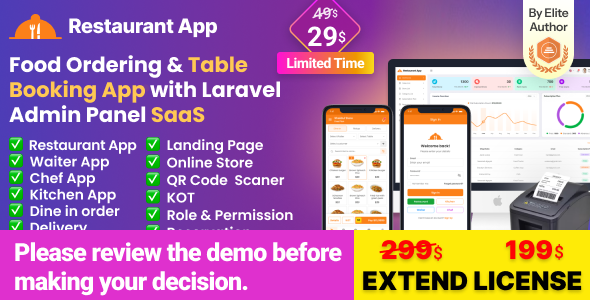
Restaurant App SaaS is an all-in-one restaurant management and food ordering solution built with Flutter and Laravel. It is designed for restaurants, fast-food businesses, coffee shops, burger shops, and other food-service businesses.
The system provides a modern Flutter mobile application together with a powerful Laravel-based administration panel. It supports restaurant management, food ordering, dine-in table management, pickup, delivery, kitchen operations, waiter management, quotations, payments, and SaaS-based subscription management.
Live Demo
Demo URL:
https://restaurantapp.acnoo.xyz/login
The demo allows you to explore the restaurant management system and its available features.
Key Features
- Food Ordering System – Manage food orders, billing, and payments efficiently.
- 11+ Payment Gateways – Supports multiple online payment gateway integrations.
- Restaurant SaaS – Manage multiple restaurants under a subscription-based SaaS system.
- Kitchen Panel – Manage kitchen operations and assign staff according to their roles.
- Waiter Panel – Manage waiters and allow them to handle restaurant orders.
- Chef Panel – Dedicated functionality for chefs and kitchen staff.
- Dine-In Table – Manage restaurant tables and customer dine-in orders.
- Pickup – Allow customers to place pickup orders.
- Delivery – Manage food delivery orders and customer delivery information.
- Quotations – Create quotations for customers and convert quotations into sales.
- Laravel Super Admin Panel – Manage subscribed restaurant businesses from a centralized administration panel.
- SaaS Ready – Supports multiple restaurant businesses under one platform.
- Role and Permission Management – Control access to system features based on user roles.
- Thermal Printer Support – Supports 58mm and 80mm thermal printers.
- Bluetooth Printing – Print sales invoices using compatible Bluetooth thermal printers.
- Regular License and Support – Includes product updates and support according to Envato license terms.
Restaurant Management Modules
The application includes dedicated modules for managing the main operational areas of a restaurant.
- Dashboard
- POS and Sales
- Food and Item Management
- Food Categories
- Modifier Groups
- Item Modifiers
- Variations
- Kitchen Management
- KOT Management
- Chef Management
- Waiter Management
- Table Management
- Dine-In Orders
- Pickup Orders
- Delivery Orders
- Customer Management
- Supplier Management
- Quotation Management
- Expense Management
- Income Management
- Reports
- HRM
- Role and Permission Management
- Cash Register
- Notifications
- Language and Localization
- RTL Support
- Subscription and SaaS Management
Key Features in Detail
1. Restaurant SaaS
The SaaS architecture allows multiple restaurant businesses to use the platform under a subscription-based system. The Super Admin can manage subscribed businesses, plans, and overall SaaS operations from the Laravel administration panel.
2. POS and Food Ordering
The POS system allows restaurant staff to create orders, add food items, apply discounts, select payment methods, and complete sales efficiently.
3. Kitchen Management
The dedicated kitchen module helps kitchen staff manage incoming orders and monitor food preparation status. Kitchen-related actions can be controlled using user permissions.
4. KOT Management
The Kitchen Order Ticket (KOT) system provides dedicated order management for kitchen operations. Staff can manage KOT status, individual item preparation status, cancellations, and printing.
5. Waiter Panel
Waiters can manage customer orders and restaurant table operations according to their assigned permissions.
6. Chef Panel
The Chef Panel provides dedicated access for chefs and kitchen staff to manage food preparation and KOT-related activities.
7. Table Management
Manage restaurant tables, access table-based orders, update orders, transfer orders between tables, and handle dine-in operations from a centralized interface.
8. Pickup and Delivery
The application supports pickup and delivery orders, allowing restaurants to manage different order types from a unified system.
9. Quotations
Create quotations for customers and convert approved quotations into sales when required.
10. Role and Permissions
Administrators can create user roles and assign permissions to control access to different modules and operations. This allows restaurants to provide staff members with only the functionality required for their responsibilities.
11. Loyalty Points and Cashback
The loyalty system supports cashback and purchase-based rewards. Restaurants can configure loyalty points and apply rewards during the sales and POS process.
12. Inventory Management
The inventory module provides functionality for managing categories, items, units, stock, recipes, searching, pagination, and quick item addition.
13. Thermal Printing
The application supports thermal invoice printing, including 58mm and 80mm printer formats. Sales invoices can also be printed from sales reports.
14. Reports
The reporting system provides information about sales, KOT operations, expenses, and other restaurant activities to help businesses monitor their performance.
15. Multi-Language and RTL
The application supports multiple languages and RTL layouts for businesses operating in different regions and languages.
License and Extended License
The application is available under the applicable Envato license options. Please review the license terms on Envato before purchasing to determine which license is appropriate for your intended use.
For SaaS projects where the application is used to provide services to multiple end users or businesses, buyers should review Envato’s current licensing requirements and select the appropriate license.
Extended License Services: Additional services such as reskinning, logo changes, theme color customization, complete setup, and white-label assistance may be available separately according to the seller’s service terms.
Important Notes
Note: The application supports printing sales invoices using compatible Bluetooth thermal printers. New sales invoices can be printed after completing a sale, and previous sales invoices can also be printed from sales reports.
Technical Requirements
- PHP 8.1+
- MySQL 8.0+ / MariaDB 10.6+
- Standard Laravel PHP extensions enabled
- Flutter 3.44.8
- Android Studio
- Android SDK
- Compatible Android device for testing
Third-Party Services and API Keys
Some features of the application use third-party services and payment gateways.
These services may require separate accounts, API keys, merchant credentials,
or other configuration. Third-party services and their associated costs are
not included with the purchase unless explicitly stated otherwise.
Disclaimer: Any transaction fees, subscription fees, API usage
fees, or other charges from third-party services are the buyer’s responsibility.
- Payment Gateways – Stripe, Razorpay, Mollie, Paytm, and PhonePe may require separate merchant accounts and API credentials.
- Firebase – Firebase services may require a Firebase project and appropriate credentials.
Flutter and Android Studio Setup Guide
Follow the steps below to prepare your development environment for the Flutter mobile application.
Step 1: Install Flutter
Download and install Flutter from the official Flutter documentation:
Step 2: Use the Required Flutter Version
Use Flutter version 3.44.8 for the current project version.
Step 3: Install Android Studio
Download and install Android Studio from the official Android developer website:
Step 4: Configure Android SDK
- Open Android Studio.
- Go to File > Settings on Windows/Linux or Android Studio > Preferences on macOS.
- Navigate to Appearance and Behavior > System Settings > Android SDK.
- Install the required Android SDK and SDK tools.
Step 5: Configure Flutter in Android Studio
- Open Android Studio.
- Open Plugins.
- Search for the Flutter plugin.
- Install the Flutter plugin and restart Android Studio.
- Open the Flutter project in Android Studio.
Step 6: Set Up an Android Device
- Enable Developer Options on your Android device.
- Enable USB Debugging.
- Connect the device to your computer using USB.
- Run flutter devices to verify that the device is detected.
Change Log
Version: 3.6.1 (06 Nov 2026)

Chef, Kitchen, and Waiter are now easy to find and use after installation. The default seeder creates demo accounts for all three, and the Role & Permission screen includes recommended presets. Chef and Kitchen users log in from the same page and are redirected to the Kitchen KOT panel, while Waiter users open the normal business dashboard. Waiter accounts retain the existing staff role for mobile app compatibility, with the Waiter label displayed in the UI.

The Kitchen module remains controlled by the plan's available_modules setting. The plan screens now explain that Kitchen & Chef must be enabled. The default Free plan includes Kitchen access, the demo subscription is marked as paid, and new free-plan subscriptions are created with paid status at zero price.
Flutter version updated 3.47.9
Version: 3.6 (10 June 2026)

Web Application
- Improved sidebar layout, navigation, and functionality.
- Added Loyalty Point Configuration for cashback and purchase-based rewards.
- Added Specific Item Loyalty Configuration for product-wise reward tracking.
- Integrated loyalty point rewards into the sales/POS process.
- Redesigned table management interface for improved usability.
- Added direct table-based order access with order update functionality.
- Implemented table transfer/movement functionality.
- Enhanced QR code management with regenerate QR functionality.
- Updated purchase unit and cart calculations based on inventory management.
- Fixed UI/UX issues and improved responsiveness.
- Resolved minor bugs and improved overall system stability.
- Added Inventory Addon.

Mobile Application
- Replaced the legacy inventory system with a full-featured Inventory Management module.
- Added categories, items, units, stock, recipes, search, pagination, and quick-add functionality.
- Implemented Loyalty Point and Cashback functionality with sales integration.
- Added automatic reward calculation during checkout.
- Enhanced printer functionality with dynamic thermal invoice formatting.
- Added configurable printer margins and localization support.
- Implemented granular permission-based access control across inventory and stock modules.
- Improved form handling, search, dropdowns, and validation.
- Refactored the application architecture and standardized the repository structure.
- Upgraded the localization system and expanded multi-language support.
- Upgraded Flutter SDK and dependencies.
- Improved cashback, invoice preview, loyalty point, and unit price calculations.
- Removed deprecated modules and migrated ingredient, stock, and unit functionality into the new inventory architecture.
Version: 3.5 (13 May 2026)

- Updated license verification.
- Improved system update architecture.
Version: 3.4 (15 March 2026)

- Added language support for the Cash Register Addon.
- Added role and permission configuration.
- Fixed several minor bugs.
Version: 3.3 (05 March 2026)

- Fixed language-related issues.
- Fixed OTP-related issues.
- Fixed CodeCanyon product ID issue.
Version: 3.2 (26 February 2026)

Web Application
- Added Kitchen module with dedicated section support.
- Updated and optimized KOT listing functionality.
- Implemented dynamic language localization with user-level configuration support.
- Resolved multiple UI/UX inconsistencies.
- Fixed various minor bugs and performance issues.

Mobile Application
- Added HRM (Human Resource Management) module.
- Added Kitchen Management module.
- Added internationalization support for HRM and Kitchen modules.
- Added module status checking for conditional feature display.
- Added ImageResolver for unified PDF image handling.
- Added role-based permission system across HRM and Kitchen modules.
- Updated Flutter SDK to 3.41.2.
- Updated project dependencies.
- Migrated deprecated code for Flutter SDK compatibility.
- Consolidated state management and fixed provider auto-dispose issues.
- Enhanced date parsing.
- Fixed linter warnings and removed unused code.
- Unified search and filter functionality across HRM views.
- Improved form validation.
Version: 3.1 (05 January 2026)

- Updated language localization.
- Updated RTL support.
- Added Kitchen role.
- Fixed design issues.
- Fixed minor bugs.
Version: 3.0 (27 January 2026)

- Added Kitchen/Chef module.
- Added KOT list and KOT actions.
- Added individual KOT item status management.
- Added direct KOT printing.
- Added KOT cancellation.
- Added KOT reports.
- Added permission control for KOT actions.
- Added food item type filtering.
- Added KOT order status filtering.
- Added push notifications.
- Added PDF generation and printing for KOT reports.
- Added detailed KOT order view.
- Fixed multiple section-related issues.
- Upgraded Flutter SDK to 3.38.7.
- Updated project dependencies.
Version: 2.3 (07 October 2025)

- Added Restaurant Addon.
- Fixed user role issues.
- Fixed design issues.
- Fixed gateway status issues.
- Fixed HugeIcons version issue.
- Fixed customer delivery address issue.
- Updated models to match API responses.
- Updated Flutter SDK to 3.35.4.
- Cleaned up dependencies.
- Updated KOT invoice ticket design.
Version: 2.2 (24 August 2025)

- Added User Role and Permission management.
- Fixed invoice number sequencing issue.
- Fixed minor issues.
Version: 2.1 (05 August 2025)

- Added Modifier Group.
- Added Item Modifier.
- Added modifier and variation assignment to items.
- Updated Sales and KOT system.
- Added Quotation functionality.
Product Links
Product Demo:
View Live Demo
Flutter Installation:
Flutter Installation Guide
Android Studio:
Download Android Studio
Download Now
LIVE PREVIEWDownload Now