
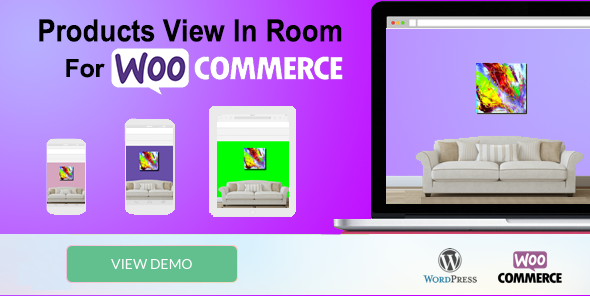
Let your customers visualize your products inside a real room before they make a purchase.
WooCommerce Products View in Room Popup is a WooCommerce visualization plugin that allows customers to see how your products can look inside a room.
Instead of simply viewing a product image on a white background, customers can open the View in Room popup directly from the WooCommerce product page and preview the product in a room environment.
The plugin is especially useful for online stores selling products that are normally displayed inside a room or interior environment, such as artworks, paintings, photographs, wall decorations, doors, lamps and many other products.
Customers can select one of your predefined room images, upload a photo of their own room, or take a snapshot of their room using their device’s webcam.
View the Plugin Demo
Want to see how the plugin works?
Why Let Customers View Products in a Room?
When customers shop online, it can sometimes be difficult to imagine how a product will look in their own environment.
A product image alone does not always give customers enough visual context. By allowing them to preview the product inside a room, you can provide a more interactive shopping experience and help customers better understand how the product may look in their space.
Give your customers a better way to visualize your products before they buy.
How Does It Work?
The plugin is designed to be simple for both store owners and customers.
1. Customer opens a WooCommerce product
The customer visits a product page on your WooCommerce store.
2. Customer opens the View in Room popup
From the product page, the customer can launch the room visualization popup.
3. Customer selects a room
The customer can choose one of the room images provided by the store owner.
4. Customer can use their own room
Customers can also upload a room image directly from their device.
5. Customer can take a room snapshot
When supported by the device and browser, customers can use their webcam to take a snapshot of their room.
6. Customer visualizes the product
The product can then be viewed within the selected room environment.
Multiple Ways to View a Product
The plugin provides several ways for customers to choose their room environment.
Predefined Room Images
Store owners can provide room images that customers can select from inside the popup.
Upload Your Own Room
Customers can upload a photo of their own room from their computer, tablet or mobile device.
Take a Photo Using Webcam
Customers can use their webcam to capture a snapshot of their room and use it for the visualization.
Perfect for Many Types of WooCommerce Products
WooCommerce Products View in Room Popup can be useful for stores selling many different types of products that customers want to visualize in an interior environment.
Examples include:
- Artworks
- Paintings
- Wall Art
- Photographs
- Posters
- Wall Decorations
- Doors
- Lamps
- Interior Decorations
- Home Decor Products
- And many other products that can be displayed inside a room
Designed for WooCommerce
The plugin works directly with your WooCommerce product pages, allowing customers to access the room visualization experience while browsing your products.
You don’t need to create a separate application or external product viewer. The View in Room experience is integrated into the WooCommerce shopping experience.
This makes it a useful addition for online stores that want to offer customers a more interactive way to explore their products.
Improve the Product Shopping Experience
Online shoppers increasingly expect more than static product photographs. Interactive visualization can give customers additional context and make product browsing more engaging.
With this plugin, customers can experiment with different room environments and see the product in a more realistic context before deciding whether it is right for them.
Help your customers visualize. Help them shop with more confidence.
Simple Popup Experience
The room visualization opens in a popup window directly from the WooCommerce single product page.
This allows customers to explore the visualization without having to leave the product page and navigate to another part of your website.
After viewing the product in the room, customers can simply close the popup and continue shopping.
Use Your Own Room Images
Store owners can provide room images that match the style and products of their store.
This allows you to create a room visualization experience that fits your particular business and product catalog.
For example, an interior decoration store can provide different room environments that help customers visualize products in living rooms, bedrooms, offices, dining areas and other interior spaces.
Customer’s Own Room
One of the most useful features is the ability for customers to use their own room image.
Instead of only looking at your predefined room examples, customers can upload an image of the actual space where they are considering placing the product.
This provides a more personalized shopping experience because customers can visualize the product in an environment that is familiar to them.
Webcam Support
Customers can also use their device webcam to take a snapshot of their room when webcam access is available and permitted by the browser.
This provides an additional convenient option for customers who want to quickly capture their room without first selecting an existing image from their device.
Key Features
- View WooCommerce products inside a room
- Popup visualization directly from the product page
- Predefined room images
- Customer room image upload
- Webcam room snapshot
- Interactive product visualization experience
- Works with WooCommerce products
- Compatible with Elementor
- Translation ready
- Compatible with Loco Translate
- Compatible with WPML
- Multiple language translations included
- One-time purchase
- No recurring plugin fees
Compatibility
WordPress
Compatible with the latest versions of WordPress.
WooCommerce
Designed specifically for WooCommerce stores.
Elementor
Compatible with Elementor.
Loco Translate
Compatible with the Loco Translate plugin.
WPML
Compatible with WPML – The WordPress Multilingual Plugin.
Localization & Languages
The plugin is translation ready and can be translated to your preferred language.
Translations are available for multiple languages, including:
- Español
- Français
- Afrikaans
- Deutsch
- Italiano
- And more
One-Time Purchase
Purchase the plugin once and use it on your WooCommerce website.
There are no recurring subscription fees for the plugin and no frequent payment plans required to keep the plugin active.
This makes it a straightforward solution for WooCommerce store owners who want to add room visualization functionality to their online store.
Give Your Customers a More Interactive Shopping Experience
Whether you sell artwork, wall decorations, doors, lamps or other interior products, WooCommerce Products View in Room Popup gives your customers another way to explore your products before purchasing.
Let your customers choose a room, upload their own room image, or take a snapshot with their webcam and experience your products in a more contextual environment.
Add product visualization to your WooCommerce store today.
We Have More Visualizer Plugins for WooCommerce
Room Paint Color Visualizer Plugin
Artwork – Painting Wall Preview Popup Plugin
AI Room Wallpaper Visualizer Plugin
Rugs Virtual Try On Floors Plugin
Questions & Customization
Have a question about the plugin or need a customization?
Please contact us at:
gordoncodem@gmail.com
Download Now
LIVE PREVIEWBUY FOR $99


