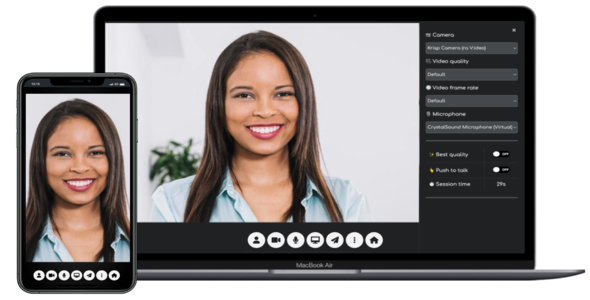
MiroTalk C2C – Self-Hosted One-to-One WebRTC Video Calls
Self-hosted WebRTC cam-to-cam video calling. Private one-to-one sessions, no app installs, no recurring platform fees, and full source code.
► Buy MiroTalk C2C – One-Time Purchase
► Try the Live Demo – No signup required
Add One-to-One Video Calls to Your App
Need private, 1-to-1 video calls for your platform? MiroTalk C2C gives you a ready-to-deploy solution – just embed an iframe or integrate via API. Perfect for support portals, telehealth apps, and marketplaces.
- ✘ No per-user pricing
- ✘ No monthly subscriptions
- ✘ No mandatory third-party conferencing service
- ✔ One-time license with full source code
Browser-Based and Cross-Platform
No downloads, no plugins – just open a browser and connect. MiroTalk C2C runs natively on all major platforms.
- ✔ Desktop – Windows, macOS, Linux
- ✔ Mobile – Android & iOS, all major browsers
- ✔ Tablets – iPad, Android tablets
- ✔ No app install required – 100% browser-based

What Is Included with MiroTalk C2C
- ✔ Full source code – customize anything, white-label ready
- ✔ REST API with documentation
- ✔ Docker support – deploy in minutes
- ✔ Iframe integration – embed in any website or app
- ✔ Step-by-step documentation
- ✔ Free lifetime updates
- ✔ Product support via CodeCanyon and Discord
Why Choose MiroTalk C2C
- ✔ Purpose-built for 1-to-1 – lightweight and fast
- ✔ Self-hosted – your server, your rules, your data
- ✔ No downloads – works in any modern browser
- ✔ No signups required – instant access for your users
- ✔ No vendor lock-in – you own the entire codebase
- ✔ Cross-platform – desktop, tablet, and mobile
- ✔ Built-in signaling – no mandatory external conferencing service
- ✔ One-time license – no recurring MiroTalk platform subscription
One-to-One WebRTC Video Call Features
HD Video Calls
Crystal-Clear Audio

Screen Sharing

Noise Suppression

Real-Time Chat

File Sharing
Call Recording
REST API
One-to-One Video Calling Use Cases
- SaaS Platforms – add 1-to-1 video to your product
- Telehealth – private doctor-patient consultations
- Education – online tutoring sessions
- Remote Teams – quick peer-to-peer check-ins
- Customer Support – face-to-face support calls
- Marketplaces – buyer-seller video meetings
Embed MiroTalk C2C in Your Website or App
Drop this into any HTML page, CMS, or web app:
<iframe
 allow="camera; microphone; speaker-selection; display-capture; fullscreen; clipboard-read; clipboard-write; web-share; autoplay; picture-in-picture"
 src="https://your-domain.com"
 style="height:100vh;width:100%;border:0;">
</iframe>
MiroTalk C2C Server Requirements
Runs on any modern Linux VPS. Deploy with Node.js or Docker.
- ✔ VPS or Dedicated server (2 vCPU, 2 GB RAM minimum)
- ✔ Ubuntu 22.04 LTS
- ✔ Node.js v22+ or Docker
- ✔ Domain with DNS + SSL
- ✔ STUN/TURN server (recommended for NAT traversal)
Script-Assisted MiroTalk C2C Deployment
Skip the manual setup. Our automation scripts handle everything for you – just insert your domain name and run a single command.
- ✔ SSL certificates – auto-provisioned via Let’s Encrypt
- ✔ Nginx reverse proxy – configured and optimized
- ✔ Dependencies – installed and configured
- ✔ Production-ready – from zero to live in minutes
The guided script simplifies installation by automating the main server setup steps.
MiroTalk C2C REST API
- Live API Explorer – try the REST API for programmatic room creation
MiroTalk C2C Support & Community
- ✔ CodeCanyon support with fast response
- ✔ Discord community – get help and share ideas
- ✔ Comprehensive setup and developer documentation included with purchase
MiroTalk C2C Buyer FAQ
Is MiroTalk C2C subscription-based?
No. It is a one-time CodeCanyon purchase under the selected license.
Can I white-label and customize MiroTalk C2C?
Yes. Full source code is included for branding and custom development.
Can multiple MiroTalk apps run on one server?
Yes. Subdomain deployment is supported, subject to available server resources.
Can I charge end users for my final product?
CodeCanyon licensing depends on how the end product is distributed and monetized. Review the current Regular and Extended License terms before purchase.
Ready to Add One-to-One Video Calls?
One-time purchase. Full source code. Lifetime updates. Deploy today.
► Buy MiroTalk C2C on CodeCanyon
Download Now
LIVE PREVIEWDownload Now