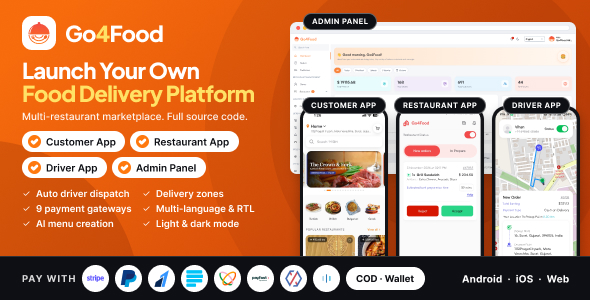
Go4Food – Multi Restaurant Food Delivery App with Admin Panel | Flutter Uber Eats Clone (Customer, Restaurant & Driver Apps for Android & iOS)
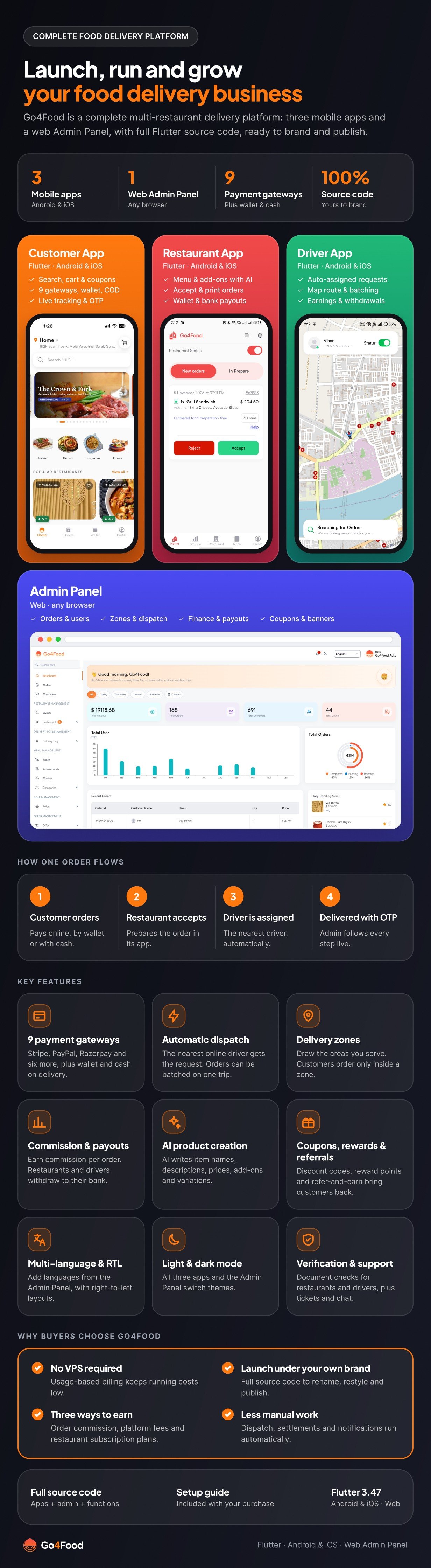
Launch your own food delivery business in days, not months. Go4Food gives you everything a delivery
platform like Uber Eats, DoorDash, Swiggy or Zomato needs – a Customer App, a
Restaurant App, a Driver App (Android & iOS) and a web Admin
Panel – ready to brand and publish as your own.
Customers order and pay, restaurants accept and cook, the nearest driver is assigned automatically and the customer
watches the delivery live on the map. You earn a commission on every order and run the whole business from one
Admin Panel.
✔ Every feature on this page is already built in and ready to use. Install, add your branding and
launch – no extra development needed.
 |
 |
Try the Live Demo
See every app working before you buy – the Admin Panel, all three apps for Android and iPhone, and the landing page.
Admin Panel
Android APK Downloads
iOS TestFlight Links
Note: Please install the TestFlight app from the App Store before clicking iOS links.
Landing Page
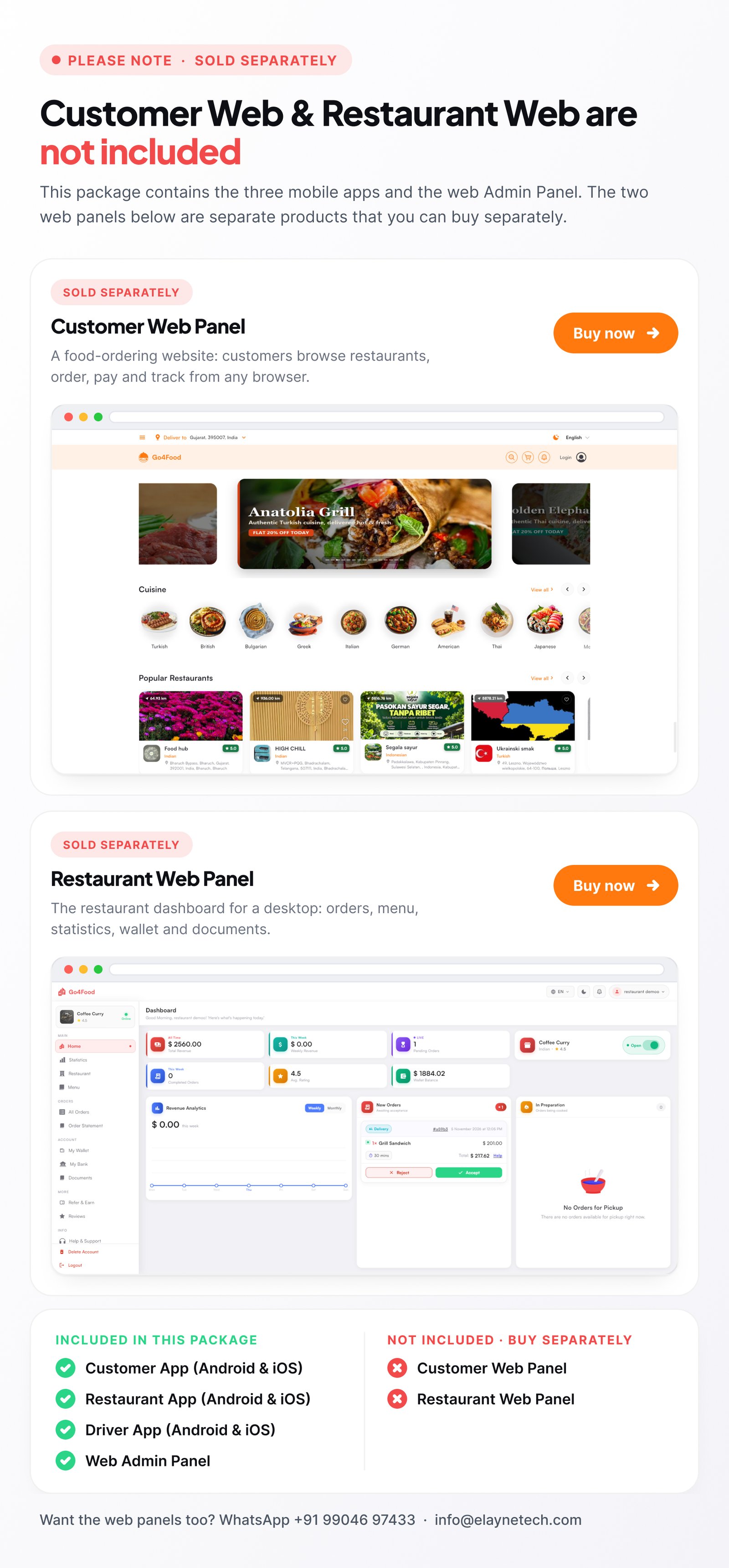
Web Add-on – Customer Website & Restaurant Web Panel (Sold Separately)
Want a food ordering website and a browser panel for restaurants too? They come together in one
Web Add-on, sold separately. The add-on needs this main package to work.
Buy the Web Add-on
· Demos:
Customer Website
·
Restaurant Web Panel

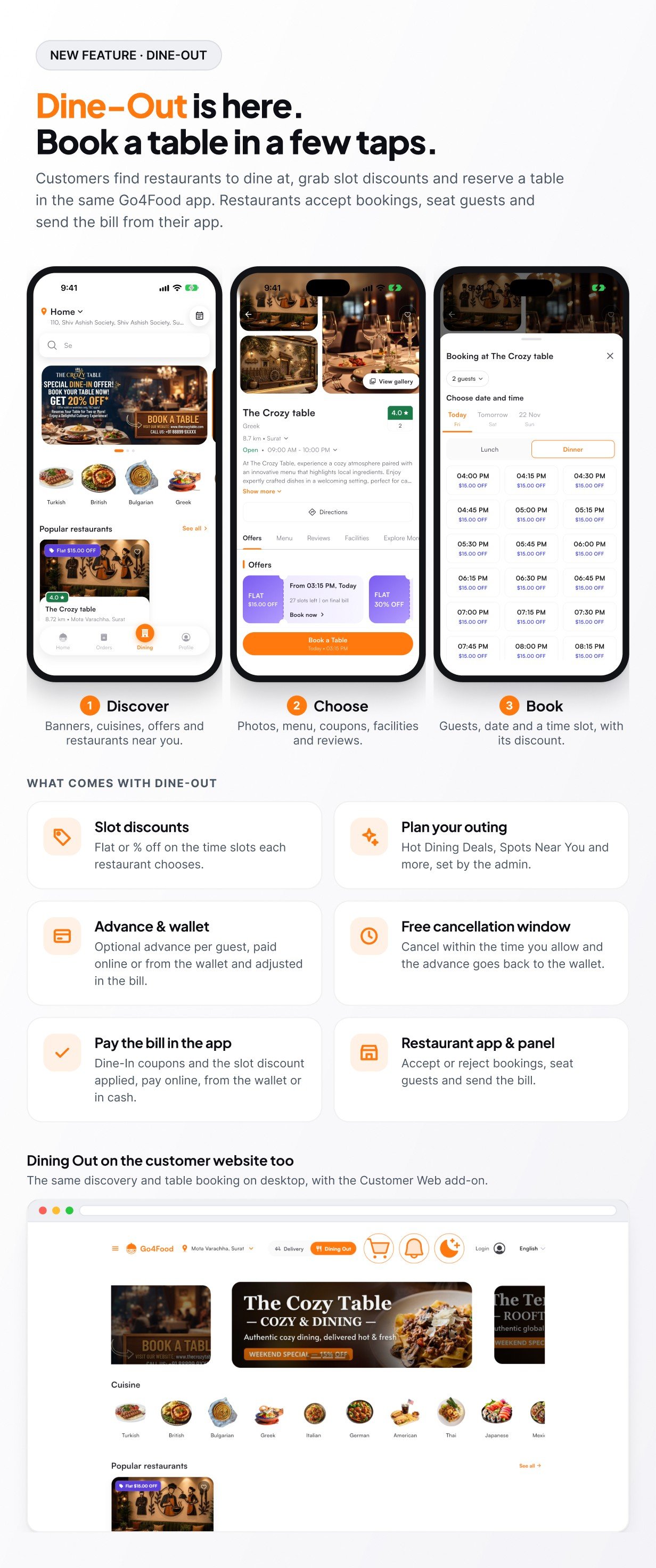
New: Dine-Out & Table Booking
Customers can now discover restaurants to dine at, grab slot discounts and book a table from the same app –
restaurants accept bookings, seat guests and send the bill from their app.
Why Business Owners Choose Go4Food
- Start earning fast: 4 complete apps in one package – ordering, payments, dispatch, live
tracking, commissions and payouts all work out of the box. - Low running costs: no servers to rent and no fixed monthly server bill. Billing is
usage-based – you pay only for what your platform actually uses, so costs stay small while you
launch and grow with your orders. - Zero server maintenance: no VPS to set up, patch, secure or restart, and no server admin to
hire. - Scales automatically: from your first order to thousands a day, without manual server
upgrades or downtime. - Many ways to earn: restaurant commission, driver commission, platform fee, delivery charges
and restaurant subscription plans. - Sell worldwide: 9 payment gateways, wallet and Cash on Delivery, any currency, unlimited
languages and RTL. - Your brand, your source code: pay once, publish under your own name, no monthly licence
fees, free lifetime updates.
Key Highlights at a Glance
- 4 apps in one package: Customer, Restaurant and Driver apps (Android & iOS) + Admin Panel
- Multi-restaurant marketplace with unlimited restaurants, or run it as a single-restaurant app
- Live order tracking on the map with real-time driver ETA
- Automatic nearest-driver assignment and order batching (multiple orders in one trip)
- Delivery zones – draw your service areas on the map and only accept orders inside them
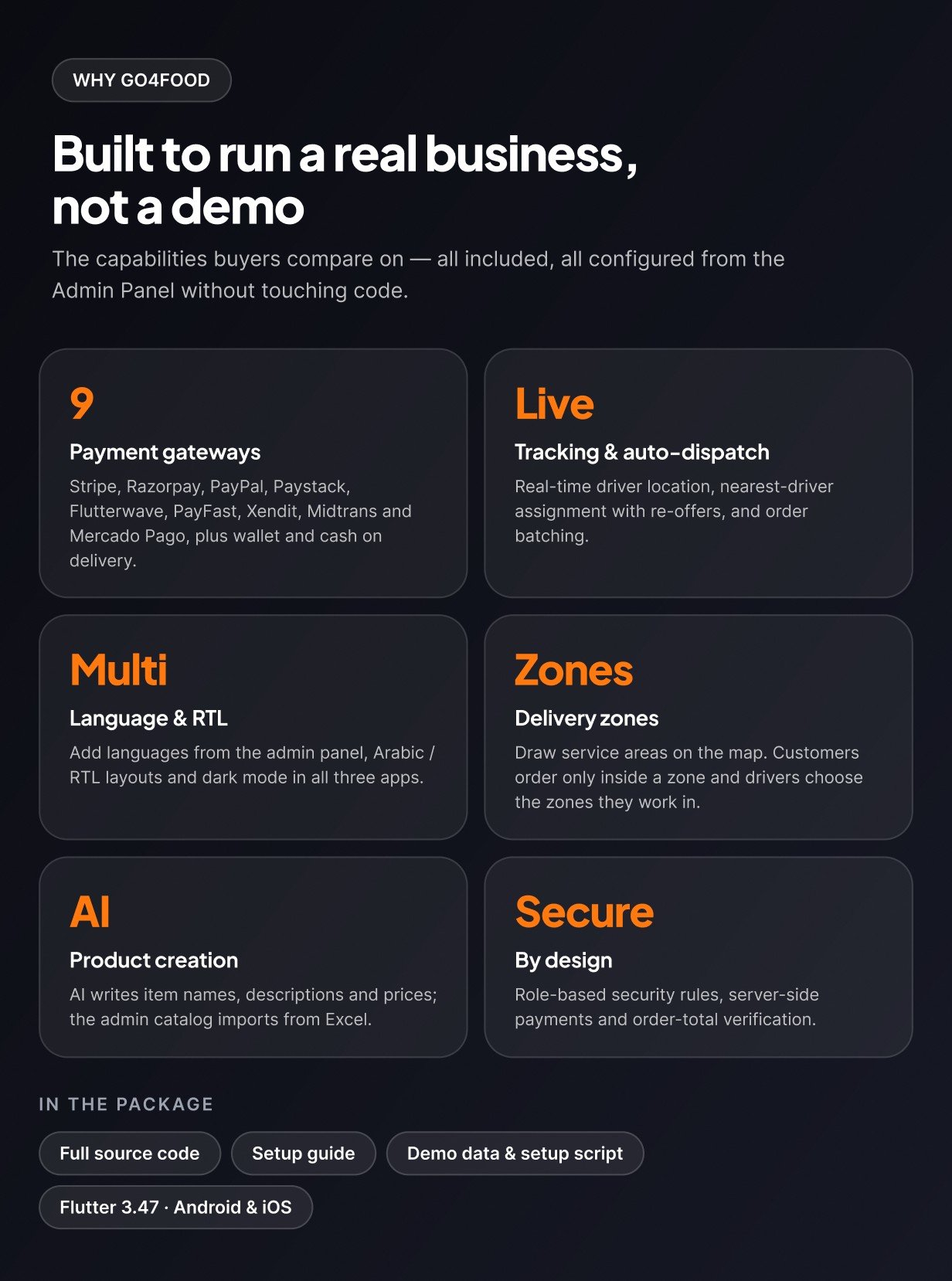
- 9 online payment gateways + in-app wallet + Cash on Delivery
- Commission per restaurant, platform fee, packaging fee and restaurant subscription plans
- Dine-Out & table booking with slot discounts, advance payment and in-app bill payment
- Reward points, Refer & Earn, coupons and promotional banners
- Multi-language with RTL (Arabic and more), Dark & Light mode, any currency




What is Go4Food?
Go4Food is a complete food ordering and delivery system for entrepreneurs, agencies
and startups. It works like the apps your customers already know – Uber Eats, DoorDash, Swiggy, Zomato,
Foodpanda, Deliveroo and Talabat – but it is your brand, your restaurants and your
revenue.
Use it to launch a multi-vendor food marketplace for your city, a single restaurant
delivery app, a cloud kitchen ordering platform, or a white-label food delivery
app for your clients. Ordering, payments, driver dispatch, live tracking, commissions and payouts all work
out of the box.
How It Works – From Order to Doorstep
- Customer orders: browses restaurants in their delivery zone, adds food to the cart and pays
online, from the wallet or with Cash on Delivery. - Restaurant accepts: gets an instant alert, accepts the order, prints the kitchen receipt and
marks it as ready. - Driver is assigned automatically: the nearest available driver in the zone receives the order.
If they reject it, the next nearest driver gets it. - Live tracking: the customer follows the driver on the map with a real-time ETA.
- Secure handover: the driver completes the delivery with the customer’s OTP code.
- Automatic settlement: the restaurant’s earnings and the driver’s delivery fee go to their
in-app wallets, and your commission is deducted automatically. They request payouts, and you approve them from
the Admin Panel.
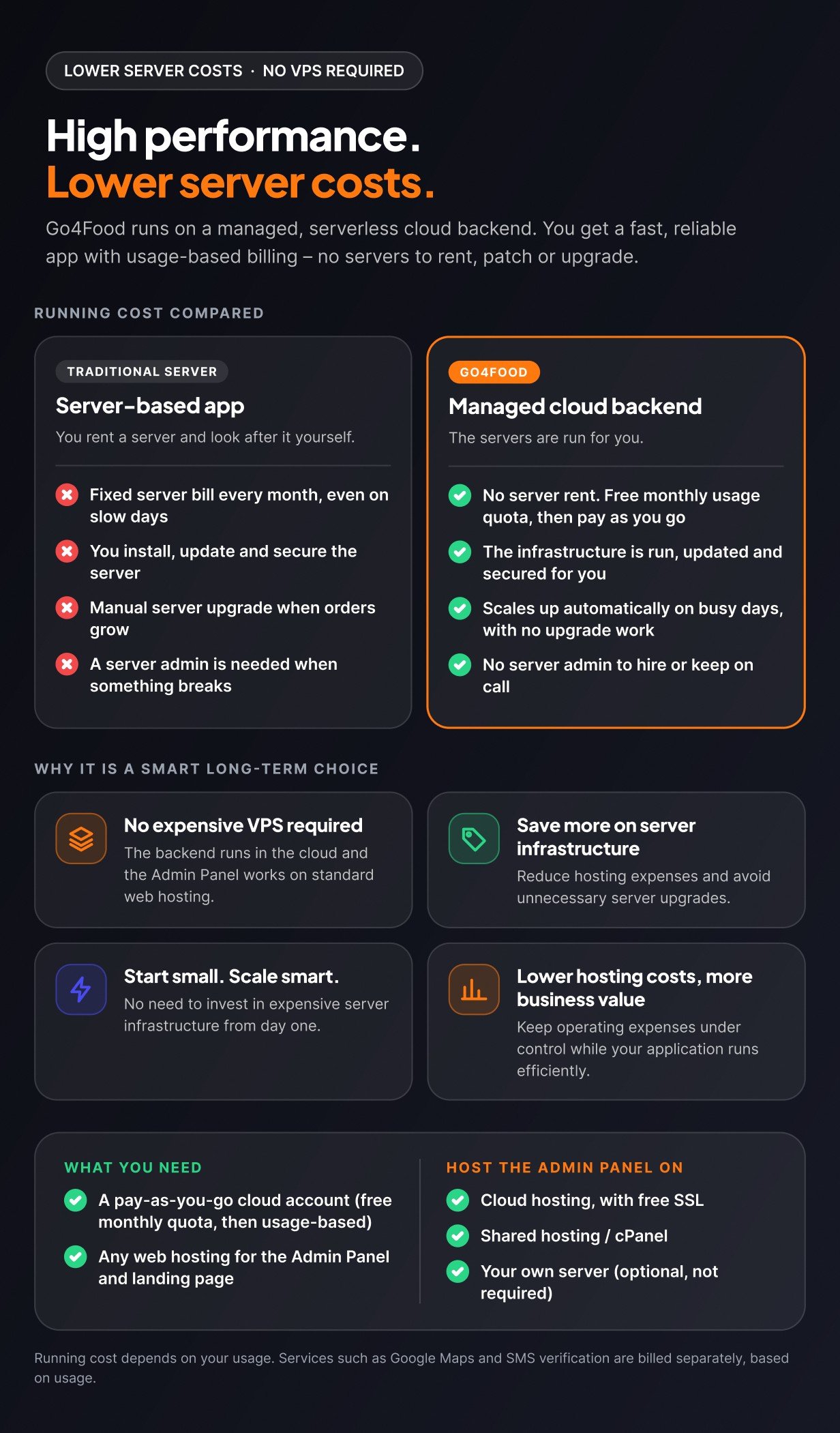
Lower Running Costs, Built to Scale
Many delivery scripts need a rented VPS that you pay for every month – busy or quiet – and keep patched, secured and
upgraded yourself. Go4Food runs on a managed, serverless cloud backend instead:
- No server rent: there is no fixed server bill. A free monthly usage quota covers development
and testing. - Usage-based billing: after the free quota you pay only for what your platform actually uses,
so your costs follow your orders. - No server maintenance: no operating system updates, security patches or restarts to manage.
- Automatic scaling: the backend handles more customers, restaurants and orders without manual
upgrades. - Optimised for low usage: paginated lists, caching, precomputed rankings and zone-based
queries keep everyday usage – and your bill – small. - Simple hosting: the Admin Panel and landing page run on any standard web hosting, including
shared hosting / cPanel.
4 Apps in One Package
- Customer App (Android & iOS): browse restaurants, order food, book a table, pay online,
track deliveries live and earn rewards. - Restaurant App (Android & iOS): manage the menu, accept orders and table bookings, print
receipts, view sales reports and request payouts. - Driver / Delivery Boy App (Android & iOS): receive orders, deliver multiple orders in one
trip, track earnings and request payouts. - Admin Panel (Web): control the whole platform – restaurants, drivers, customers, orders,
zones, commissions, payments, marketing and settings.
Customer App Features – Order Food Online with Ease
- Location-based home screen with popular restaurants, top-rated dishes and cuisines
- Search with filters: cuisine, veg / non-veg, rating and distance
- Detailed menus with variations, add-ons and live stock status
- Smart cart with quantity control, cooking instructions and delivery instructions
- Home Delivery and Takeaway options at checkout
- Discount coupons with minimum-order rules (fixed or percentage)
- Real-time order tracking on the map with live driver ETA
- Dine-Out – discover restaurants to dine at, see slot discounts, book a table and pay the bill
in the app - Reward points – earn on every order and redeem on future orders (My Rewards screen)
- Refer & Earn – share a referral code and earn wallet credit when a friend joins
- In-app wallet with top-up through any enabled payment gateway
- Delivery tips with preset or custom amounts
- Favourite restaurants and dishes
- Ratings and reviews for restaurants, dishes and drivers
- Multiple saved addresses with automatic delivery-zone detection
- Order history with full bill breakdown and email invoice
- Help & Support tickets with in-app support chat
- Push notifications for every order status change
- Browse as a guest – login is only required to place an order
Restaurant App Features – Complete Vendor Dashboard
- Guided onboarding with document upload and admin approval
- Cover photo and logo upload with a built-in image cropper, so images always fit perfectly
- Menu management with categories, sub-categories, add-ons, variations and item tags
- AI-powered product creation – generate names, descriptions, prices, add-ons and variations in
one tap - Import from Admin Products – pick ready-made dishes from a catalog and import them in bulk
- Bulk tax apply – select multiple products and set taxes in one action
- Live order flow: new → accepted → preparing → ready → handed to driver
- Table bookings – accept or reject bookings, seat guests and send the bill
- Bluetooth thermal printer support for kitchen receipts
- Opening hours for each day of the week (including past-midnight hours) plus an Open/Closed switch
- Self-delivery mode – restaurants can deliver with their own drivers
- Subscription plans with product limits, commission rules and plan upgrades
- Sales analytics with charts, statements and downloadable reports
- Wallet, payout requests and full transaction history
- Packaging fee per restaurant
Driver App Features – Powerful Delivery Boy App
- Instant new-order alerts with pickup and drop details and an accept countdown
- One-tap accept or reject with configurable rejection reasons
- Order Batching – deliver multiple orders in one trip (radius, preparation-time gap and maximum
orders set by the admin) - Working zones – drivers only receive orders from the zones they choose
- In-app map with the route to the restaurant and to the customer
- Live location sharing with the customer during delivery
- OTP-verified delivery for a secure handover
- Auto-offline – the driver goes offline automatically when the app is closed or killed
- Earnings dashboard with daily, weekly and monthly charts
- Wallet, bank details and payout requests
- Document upload with admin verification
- Trip history with full bill details, including Cash on Delivery orders
Admin Panel Features – Control Your Entire Business
- Dashboard with revenue, orders, users and performance metrics
- Detailed screens for every customer, driver, restaurant owner and restaurant
- Order management with status override, manual driver assignment and full bill breakdown
- Restaurant and driver approval with document review
- Payout request approval for restaurants and drivers
- Commission settings – a default rate for all restaurants, a custom rate for any single
restaurant (fixed or percentage), and driver commission - Zone Management – draw delivery zones on the map and expand to new areas or cities anytime
- Delivery charge settings: minimum fare within X km, then per-km pricing, or free delivery
- Platform fee and packaging fee modules
- Dine-In Settings – turn table booking on or off, set the booking rules and manage Dine-In
restaurants, bookings and Plan-your-outing cards - Flexible tax engine – order-wise or product-wise, multiple tax rules (restaurant, delivery,
packaging, product), fixed or percentage - Admin Products catalog with Excel bulk import and a downloadable template
- Reward System and Order Batching settings
- Coupons and promotional banners
- Email templates with a Send Test Email option, plus SMTP settings
- Push notification campaigns to all users, a group or a single user
- Landing Page CMS – edit the hero, features, testimonials and contact details; changes go live
instantly - Roles & Employees with view / create / update / delete permissions per module
- Support ticket system with automatic assignment to support staff
- Onboarding screens, Privacy Policy and Terms editor, and cancellation reasons
- Currency, languages, theme colour, logo and minimum app version control
- Export lists to PDF and Excel
9 Payment Gateways + Wallet + Cash on Delivery
Accept payments worldwide from day one. All gateways are already integrated – just turn them on and add your keys
in the Admin Panel, with no code changes:
- Stripe – cards and wallets, global coverage
- Razorpay – India (UPI, cards, net banking)
- PayPal – worldwide checkout
- Paystack – Nigeria, Ghana, Kenya, South Africa
- Flutterwave – pan-African payments
- Mercado Pago – Latin America
- PayFast – South Africa
- Midtrans – Indonesia
- Xendit – Southeast Asia
- In-App Wallet – top up once, pay in one tap
- Cash on Delivery (COD) – with automatic driver and restaurant settlement
Maps, Delivery Zones & Smart Dispatch
- Google Maps, or OpenStreetMap as a free alternative (switch from the Admin
Panel) - Address search and pin-drop location picker
- Delivery zones – customers only see restaurants that deliver to them; customers outside your
zones cannot order - Automatic nearest-driver assignment, skipping drivers who rejected the order
- Distance-based delivery charges
- Real-time ETA updates as the driver moves
Login & Security
- Email login and registration with forgot-password
- Google Sign-In and Sign in with Apple
- Phone OTP login with automatic country-code detection
- App Check (Play Integrity / App Attest) to block fake and abusive traffic
- Role-based security rules, and payment keys kept on the server side
- In-app account deletion (App Store and Google Play compliant)
- Force update – block outdated app versions until users upgrade
- Duplicate email and phone protection at sign-up
Multi-Language, RTL & Dark Mode
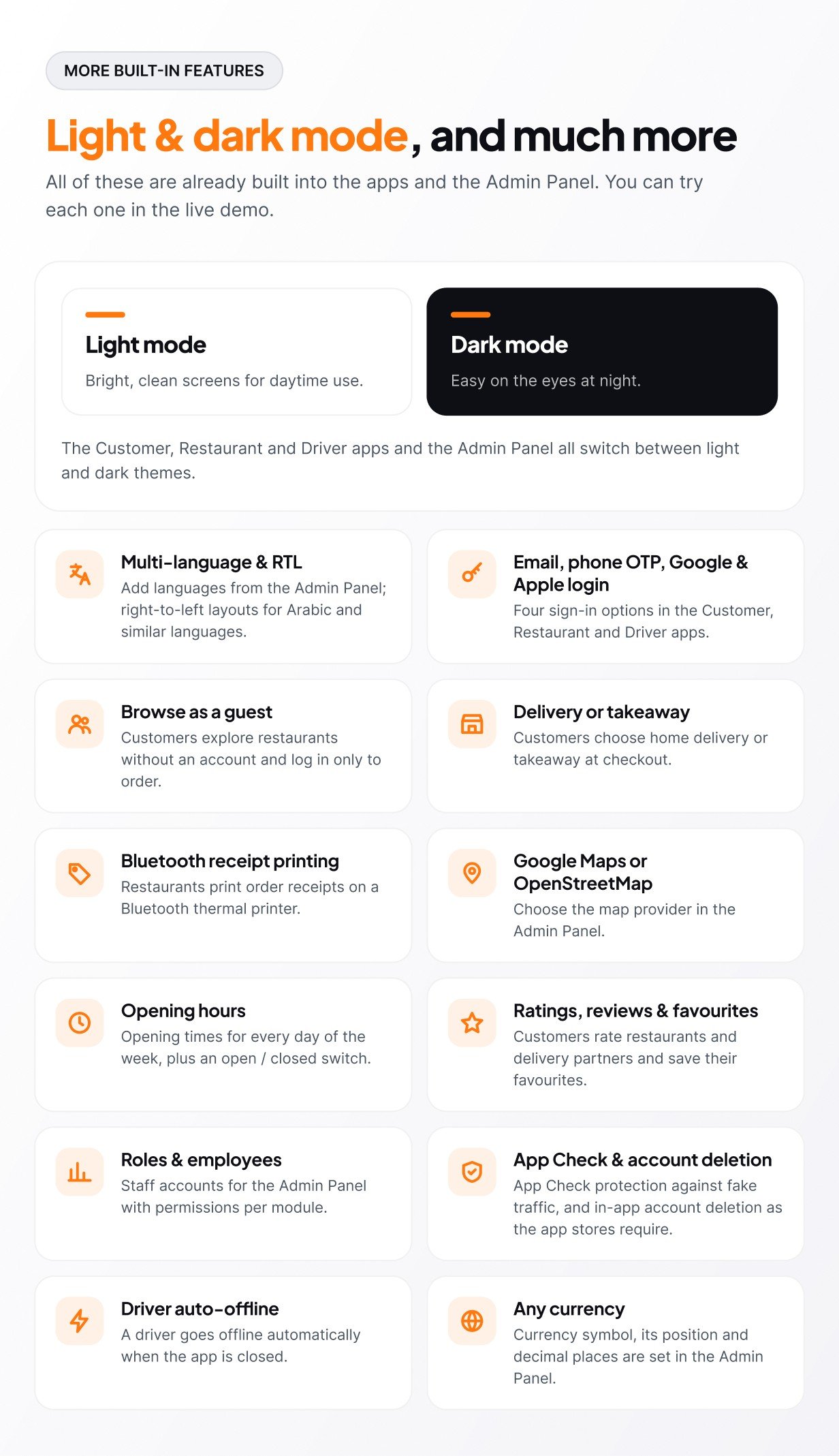
- Multi-language with an in-app language switcher – add unlimited languages from the Admin
Panel - Admin content (categories, taxes, banners and more) can be entered in every language
- RTL support for Arabic, Hebrew, Urdu and Persian
- Dark Mode and Light Mode
- Any currency, with symbol position and decimal control
Monetization – Multiple Revenue Streams
- Commission on every restaurant order (default or per restaurant, fixed or percentage)
- Commission on driver delivery fees
- Separate commission on Dine-In bookings
- Platform fee per order
- Delivery charges
- Restaurant subscription plans (recurring revenue)
- Promotional coupons and banner slots
Why Choose Go4Food?
- One purchase = 4 complete apps + landing page + setup guide
- All features are ready to use – no extra development needed to launch
- No server to rent or maintain – usage-based billing that grows with your business
- Store-ready: Sign in with Apple, in-app account deletion and privacy flows that meet App Store
and Google Play policies - Easy to rebrand: app name, logo, colours and splash screen
- Pay once, own the source code – no monthly licence fees
- Free lifetime updates, kept current with the latest Flutter versions
- Dedicated support with fast response times
Use Cases – Launch Any On-Demand Delivery Business
- Food delivery startup – like Uber Eats, DoorDash, Swiggy or Zomato
- Multi-restaurant marketplace for your city or country
- Restaurant discovery and table booking – with Dine-Out
- White-label delivery apps for agency clients
- Cloud kitchen / ghost kitchen ordering platform
- Single restaurant app with delivery and takeaway
- Grocery, pharmacy, bakery, coffee or beverage delivery
What’s Included
- Full Customer App source code (Android + iOS)
- Full Restaurant App source code (Android + iOS)
- Full Driver App source code (Android + iOS)
- Full Admin Panel source code (Web)
- Backend functions source code (driver assignment, payments, ticket routing)
- Marketing Landing Page with Privacy Policy and Terms pages
- Demo data and a setup script to get started quickly
- Excel product-import template
- Step-by-step setup guide (provided with your purchase): installation, branding and renaming, maps, push
notifications, payment gateways and store deployment - Free lifetime updates
What’s NOT Included
- Web Add-on – Customer Website and Restaurant Web Panel, sold separately
(buy here) - Cloud, Google Maps, Apple and Google Play accounts and their usage costs
- Payment gateway merchant accounts (you register your own)
- App publishing service (we guide you; publishing is done from your own accounts)
- Demo images, restaurant photos and brand assets shown in the previews
Requirements
Please make sure you can meet these requirements before purchasing:
- Flutter SDK (latest stable) with Android Studio and/or VS Code
- A pay-as-you-go cloud account for the backend – a free monthly usage quota covers development
and testing; after that you pay only for what you use - A Google Maps API key (Google Cloud gives a free monthly allowance) – or use the built-in
OpenStreetMap option - macOS with Xcode to build and publish the iOS apps
- Google Play Console account ($25 one-time) and/or Apple Developer account ($99/year) to publish
- Basic Flutter knowledge is recommended for customization
Recommended Hosting – Hostinger
Use the link below to buy hosting and a domain for your Admin Panel and Landing
Page with a flat 20% discount. We use this provider for our own demo websites.

Frequently Asked Questions (FAQ)
How much does it cost to run?
There is no server to rent, so there is no fixed monthly server bill. The backend uses usage-based billing with a
free monthly quota, so you pay only for what your platform actually uses and costs grow with your orders. Google Maps,
SMS and payment gateways are billed separately by those providers.
Do I need a VPS or my own server?
No. The backend is fully managed in the cloud, and the Admin Panel and landing page work on any standard web
hosting, including shared hosting / cPanel.
Will it handle growth?
Yes. The backend scales automatically as customers, restaurants and orders grow, with no manual server upgrades.
Is the full source code included?
Yes. You get the complete source code of the Customer, Restaurant and Driver apps, the Admin Panel, the backend
functions and the landing page.
Can I rebrand the apps with my own name and logo?
Yes. You can change the app name, logo, colours, splash screen and package names, and the brand name, logo and
theme colour can also be changed from the Admin Panel.
Can I publish the apps under my own developer accounts?
Yes. The apps are published on Google Play and the App Store from your own accounts, under your own brand.
Can I run it for a single restaurant?
Yes. Add just one restaurant and the platform works as a single-restaurant ordering and delivery app.
Can I set a different commission for each restaurant?
Yes. Set a default commission for all restaurants, then a custom fixed or percentage commission for any individual
restaurant.
Can I limit delivery to specific areas?
Yes. Draw delivery zones on the map in the Admin Panel. Customers outside your zones cannot place orders, and you
can add new zones whenever you expand.
Is Cash on Delivery supported?
Yes. Cash on Delivery works alongside the online gateways and the wallet, with automatic settlement between the
driver, restaurant and admin.
Can restaurants use their own delivery staff?
Yes. With self-delivery mode, a restaurant can add and assign its own drivers.
Is the customer ordering website included?
No. The Customer Website and the Restaurant Web Panel come together in the Web Add-on, which is sold separately and
needs this main package.
Do I need coding knowledge?
You can install and launch by following the setup guide included with your purchase. Custom changes to the apps
require a Flutter developer.
Important Notes (Please Read Before Purchase)
- This is a source-code product, not a hosted SaaS. You deploy it on your own
cloud project and store accounts, and you own your data completely. - Third-party services (cloud backend, Google Maps, SMS OTP, payment gateways) may charge usage-based fees billed
directly by those providers. Most have generous free tiers. - All demo content (restaurant names, food photos, logos) is for preview purposes only.
- The Regular License covers one end product for yourself or one client (free end product). If
you charge end users or resell the app to multiple clients, an Extended License is required –
see the Envato License terms. - Support covers installation guidance, bug fixes and questions about item features. It does not include custom
feature development (available separately – contact us for a quote). - We test every release. If you find a bug, report it through our support channel and we will fix it promptly.
Installation & Customization
Every purchase includes a step-by-step setup guide covering backend setup, package renaming
and branding, maps, push notifications, payment gateway
keys and store deployment. The source code is cleanly structured and modular, making it
easy for developers to rebrand, extend or connect to other services.
Regular Updates & Continuous Improvement
We ship updates regularly – see the changelog below. Every purchase includes lifetime access to all future updates.
Feature requests from buyers are considered for upcoming releases, and the project is kept up to date with the
latest stable Flutter version.
Dedicated Support
We provide full support via email and our ticket system, including installation help, configuration guidance and
bug fixes. If you need help after purchase, our support team responds quickly.
Important Notice
Beware of scams and fraud: This product is officially sold only through the Envato Marketplace (CodeCanyon). Do not purchase from
unauthorized sources or third-party resellers. Items purchased outside CodeCanyon may contain malware and are not
eligible for updates or support. For support, updates and assistance, always contact our official support
team via the contact section on CodeCanyon.
Refund Policy
Please review the item description, live demos and requirements carefully before purchasing. Purchases made by
mistake or without checking the requirements are not eligible for a refund.
Due to the digital nature of this product and Envato marketplace policies, refunds cannot be provided once the item
has been downloaded. All sales are final. However, we will gladly help you resolve any technical issue or bug, in
line with the
Envato refund policy.
Changelog
Version 4.7.0 – 20 November 2026
- New — Dine-In & Table Booking: customers can book a table, pick a date, time slot, guests and section, and pre-order food with the booking. Restaurants manage tables (grouped by section), reservation rules, weekly booking time slots and the full booking flow (accept / reject, start cooking, food ready, seated, complete with final bill) from the restaurant app and panel. The Admin Panel controls the feature with Dine-In Settings (master switch, pre-order, on-venue payment, no-show refund and booking rules) and a separate Dine-In admin commission under Admin Commission.
- New — Slot offers: restaurants can add a % discount to any booking time slot; customers see the offer while choosing a slot and it is applied to the pre-ordered food.
- New — Coupon & offer types: coupons and restaurant offers can be created for Online Orders or for Dine-In bookings, and each flow only shows its own type.
- New: separate Table Bookings page in the Restaurant Panel with booking cards and filters (New, Upcoming, Kitchen, Seated, History).
- Improved design: redesigned Restaurant Panel screens — Home dashboard, Statistics, Restaurant profile & offers, Menu and Add Menu Item, All Orders, Order Details, Order Statement, Drivers (add / edit in a dialog with profile photo), Dine-In setup and booking dialogs, date / time pickers and date-range picker — with a responsive layout, light / dark theme support and dotted section titles. Admin dashboard now opens on the Today filter.
- Bug fixes: Customer Web wallet screen errors and Add Money dialog, payment settings permission errors on the web apps, restaurant open / offline status not updating live, page not returning to the restaurant screen after saving, snackbar / toast issues after saving, slow loading when editing a menu item, driver document images sometimes missing in the Admin Panel, table booking data parsing errors and several layout overflow issues.
- Validation: Dine-In can be enabled only after the booking rules are saved, restaurants can enable Dine-In only after adding tables, rules and time slots, and zero values are no longer accepted for booking rules or admin commissions.
Version 4.6.0 – 23 October 2026
- New: admin dashboard filters.
- New: dynamic bank forms for restaurants and drivers, managed from the Admin Panel.
- New: redesigned tables and dialogs for restaurant join requests and delivery-boy verification; redesigned notification screen in the apps.
- Security: role-based database & storage security rules, payment secret keys and push / e-mail credentials moved to the server side, server-side verification of order totals, authorization check on driver deletion; no project credentials shipped in the package.
- Bug fixes: driver map loading (first visit after sign-up and when returning to the home screen), missing owner and driver documents in admin details, join-request and verification status updates, admin image loading, payment-method loading, zone editing, stray text underlines, notification deletion, driver-assignment screen shown without the Self Delivery subscription, and the missing seconds count when assigning stacked orders.
- SDK: supported on the latest stable Flutter 3.47.7; Android build tools and all dependencies upgraded; iOS 27 UIScene lifecycle.
Version 4.5.0 – 14 October 2026
- New Look: all applications redesigned with a modern UI.
- Dependencies: upgraded across all apps and supported on their latest versions.
- Bug fixes & performance: minor bug fixes and performance improvements.
- SDK: supported on the latest stable Flutter 3.47.1.
Version 4.4.0 – 10 August 2026
- Performance: faster data loading and much lower database usage — server-side zone/geohash restaurant queries, paginated lists, precomputed “Top Rated”, caching, and right-sized images.
- Search: runs on submit only (search button / keyboard), multi-language matching, and pagination fixes.
- Bug fixes & stability: edge-to-edge Android status bar, tracking-map crashes, image/UI crashes, consistent open-first & nearest sorting, order-assignment reliability, and responsive Customer Web.
- New — Per-Restaurant Commission: new restaurants use the Settings default; the Admin Panel can set a custom commission (Percentage/Fix) for any individual restaurant that overrides the default for that restaurant only.
- Dependencies: upgraded across all apps & backend functions (Node.js 24); Android targetSdk 36.
- SDK: supported on the latest stable Flutter 3.44.8.
Version 4.3.0 – 18 July 2026
- Added Dynamic Localization across the system — dynamic content (taxes, categories, banners, and other admin-managed data) can now be entered per language from the Admin Panel and each app displays it in the user's selected language automatically.
- Admin Panel refinements: language persistence, list refresh fixes, and variation/add-on editing.
- Improved overall app performance and stability.

Admin Panel:

- Fixed Cancelling Reason edit mode data loading.
- Fixed dropdown string conversion issues.
- Fixed Banner List not refreshing after add, edit, or delete.
- Added support for editing product variations and add-ons.
- Fixed language persistence after refresh and hot reload.
- Fixed temporary incorrect text displayed for 2–3 seconds after the first language switch and page refresh.
- Fixed dynamic title translation in the Restaurant Offer table.
- Fixed Subscription History not refreshing when filters change.
- Fixed Material assertion errors in the Restaurant Order, Driver Order, and Owner Subscription view dropdowns.
- Fixed Settings menu not refreshing after language changes.

Customer App:

- Display "Place Order" button only after successful payment confirmation.

Restaurant Web:

- Fixed Restaurant Address field to correctly open the map on click.
- Fixed minor UI issues and improved overall user experience.
Version 4.2.0 – 30 June 2026
Restaurant App
- Fixed the mobile number field not clearing after changing the country format.
- Prevented adding money to the wallet when the entered amount is 0.
- Fixed a null value error after uploading a restaurant image while adding a restaurant.
- Added a toast message when payment gateway configuration is missing while adding money to the wallet.
- Fixed mobile number validation issues.

Customer App
- Fixed the mobile number field not clearing after changing the country format.
- Prevented adding money to the wallet when the entered amount is 0.
- Fixed an issue where the Add Review option remained visible after a review was submitted, preventing duplicate reviews.
- Added a toast message when payment gateway configuration is missing while adding money to the wallet.
- Added a Reward System to earn and redeem reward points on orders.
- Added a My Rewards screen to view reward point balance, transaction history, and redeemed rewards.
- Fixed mobile number validation issues.

Driver App
- Fixed the mobile number field not clearing after changing the country format.
- Prevented adding money to the wallet when the entered amount is 0.
- Added a toast message when payment gateway configuration is missing while adding money to the wallet.
- Added Order Batching functionality, allowing drivers to receive and deliver multiple orders in a single trip.
- Fixed mobile number validation issues.

Admin Panel
- Added Batching Settings to configure radius limits, preparation time gaps, and the maximum number of orders per driver.
- Added Reward System configuration and management.
Version 4.1.0 – 7 May 2026
- Fully redesigned Admin Panel for a cleaner, more modern experience.
- Added the ability to send test emails directly from the admin panel.
- Resolved minor bugs affecting application stability and user experience.

Admin Panel (Redesigned):
- Dashboard refreshed with updated layout, cards and metrics.
- Customer Details, Delivery Boy Details, Owner Details and Restaurant Details screens redesigned for clarity.
- Support User Dashboard reworked for faster ticket triage.
- Email Templates module redesigned with cleaner editor surface.
- New “Send Test Email” action lets admins verify any template against a target inbox before sending live.

General :
- Bug fixes across customer, restaurant, driver and admin apps for improved stability.
Version 4.0.0 – 21 April 2026
- Drivers can now pick their working zone and only receive orders assigned from within that zone.
- Force-update flow now blocks outdated app versions until users install the latest release.
- Driver status flips to offline automatically when the app is swiped away or killed.
- New "+ Add Item", "Import Excel", and "Download Template" actions on the Admin Products list make bulk product entry possible.
- Restaurant app now has an "Import from Admin Products" option when adding a menu item, with a searchable multi-select picker and a sticky bottom bar to import several at once.
- Taxes now apply correctly in both order-wise and product-wise modes and flow through the full bill.
- Food Details page in the admin panel has been fully redesigned.
- Landing page new design with fully dynamic.
- Upgraded to Flutter 3.41.6 for improved compatibility.
- Updated all project dependencies to their latest stable versions.
- Resolved minor bugs affecting application stability and user experience.
Version 3.9.0 – 30 March 2026
- Improved overall app performance and stability.
- Fixed bugs and optimized app responsiveness.

Customer App:
- Added pagination in Notification screen.
- Added pagination in Orders screen.
- Implemented language selection after Splash Screen.

Restaurant App:
- Added pagination in Notification screen.
- Added pagination in Orders screen.
- Added pagination in Wallet (Transaction History).
- Added pagination in Review screen.
- Implemented language selection after Splash Screen.
- Added Subscription feature.

Driver App:
- Added pagination in Notification screen.
- Implemented language selection after Splash Screen.

Admin Panel:
- Added search functionality in Drawer.
- Enabled order status change by Admin.
- Separated Restaurant Settings and Driver Settings.
- Fixed minor UI and functional issues.
Version 3.8.0 – 05 March 2026
- Fixed minor bugs and improved stability.
- Updated project to support latest Flutter version(3.41.1).
Version 3.7.0 – 21 February 2026
- Added Help & Support feature.
- Added Role & Employee management.
- Added Change Password option on Admin login screen.
- Enabled Web notification receiving with click action support.
- Optimized Google Maps API performance.
- Fixed minor bugs and improved stability.
- Updated project to support latest Flutter version(3.41.1).
Version 3.6.0 – 15 January 2026
- Integrated OSM (OpenStreetMap) for map functionality.
- Updated cuisine display order to show first for open restaurants and last for closed restaurants.
- Fixed minor bugs and improved overall performance.
- Updated project to support Flutter version 3.38.0.
Version 3.5.0 – 12 December 2025
- Added AI setting with enable/disable option.
- Fixed account disable screen and added logout button.
- Added delivery charge enable/disable with "Free Delivery" display and driver wallet hidden when disabled.
- Added default language selection from admin panel.
- Improved live tracking for customer and driver apps.
- Updated project to support Flutter version 3.38.3.
Version 3.4.0 – 21 November 2025
- Additional Packaging Fee Module.
- Multiple Tax Rule System.
- Real-Time ETA Enhancement.
- AI-Powered Smart Features for prodcuct create.
- Platform Fee Module.
- Dynamic Country Code Detection.
- Zone-Based Search & Redirection.
Version 3.3.0 – 07 November 2025
- Fixed: Zone feature issue.
- Improved: Top-rated foods and popular restaurants display correctly.
- Added: Cuisine-wise restaurant and food listing.
- Enhanced: Search functionality for both Restaurants and Dishes.
- Implemented: Zone feature for managing delivery areas and coverage.
Version 3.2.0 – 01 November 2025
- Referral & Earn Feature.
- Admin Push Notification System.
- Email Templates Integration.
- Withdraw Request Approved – Push Notification.
- Updated Dependencies (Flutter & backend latest).
- Supported Flutter Version: Flutter 3.24.0 (Stable).
- Auto Restrict Orders – Restaurant Cannot Accept If Driver Not Available.
Version 3.1.0 – 02 october 2025
- Added Home Delivery & Takeaway Option (Customer App).
- Introduced Self-Delivery Feature (Restaurant Panel)
- Integrated Xendit & Midtrans Payment Gateways.
- Updated Restaurant Document Verification Flow for smoother onboarding.
- Minor bug fixes and performance enhancements.
Version 3.0.0 – 01 September 2025
- Minor bugs fixing.
Version 2.0.0 – 06 August 2025
- Customer can now choose between Home Delivery and Take Away.
- Vendor-side and Driver-side document requirements are now type-based and configurable from the admin panel.
- Document submission flow is now dynamic based on account type.
- Added Owner Add option in Admin Panel for better management of restaurants/business owners.
- Revamped home screen with a cleaner and modern layout.
- Fixed home screen auto-refresh issue on return from background or other pages.
- Users can explore the app and browse restaurants without login (ordering still requires login).
Version 1.0.0 – Initial Launch
- Customer App (Android & iOS)
- Driver App (Android & iOS)
- Restaurant Panel
- Admin Panel with cloud backend
- Core features: ordering, delivery tracking, vendor management, real-time updates
Technology
Built with Flutter (Android & iOS) and Firebase Database.
Download Now
LIVE PREVIEWDownload Now