


View Live Demos | Read the Documentation
Ultimate WooCommerce Ajax Cart – Floating, Slide-in, Popup Cart Plugin For WordPress
Ultimate WooCommerce Ajax Cart is a premium extension for WooCommerce that displays fancy Carts in different locations of your eCommerce store. It will allow your customers to quickly view the products that they have added to their cart list. This can make your WooCommerce powered online store more effective as your customers will be able to update or remove any products that they have selected without having a cart page. Moreover, the extension also automatically calculates the total amount of price for the products that you have entered on your cart along with the currently running coupon codes on your webshop.
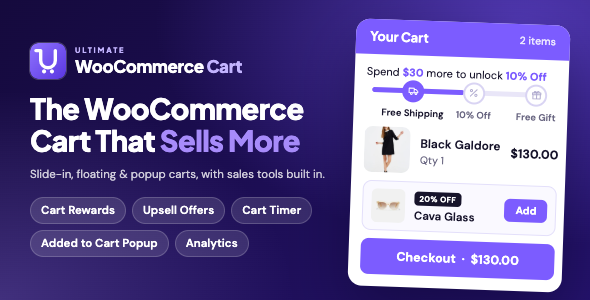
The cart also helps every order grow. A rewards bar unlocks free shipping, discounts and free gifts as the cart fills up. Special offers suggest the right add-on at the right moment. A countdown timer and low stock notices give shoppers a reason to check out now. And the Cart Analytics screen shows what all of it earned you.
The most interesting feature of Ultimate WooCommerce Ajax Cart is that you can display the Checkout Form in the same window without your user having to go to the checkout page. This will reduce the checkout time and increase the conversion rate of your store. You can configure either to display the Checkout Form on the same slide/floating/popup window or redirect to the checkout page. On clicking the checkout button, the checkout form will load on the same window or redirect to another page according to the configured setting. Moreover, you can set the font size, the color of the labels, and the border/background color of the input fields.
Ultimate WooCommerce Cart is a highly customizable add-on packed with tons of features and functionalities to personalize the mini cart. You will be able to create an unlimited number of carts and display the cart items in 3 different layouts i.e. as a Slide In, Floating, or Popup. You can display or hide the created cart on selective pages only. Apart from that, you can selectively display different carts on different pages, devices or user roles. Moreover, the extension provides you endless possibilities to design your mini shopping cart and display it on your online store in a stunning way.
Pagebuilders are becoming very popular these days. Nevertheless, Ultimate WooCommerce Ajax Cart is also compatible with the most popular plugin “Elementor”. You can seamlessly create a custom designed Cart Panel using Elementor. The plugin has 17 built-in elements required for building an Ajax cart, including the Rewards Bar, Cart Offers and Cart Timer. Just combine them, play with the colors, backgrounds, fonts, and spacing, and create a unique looking cart that looks different from others. The built-in Elementor Elements are Ajax powered and will change without having to reload the page on adding or removing any items from the cart.
If you have no time to play with the settings and want to build the cart in quick time, then you can import any of the 15 ready-made templates with just one click, as easily as that.
Grow Every Order
Cart Rewards: Free Shipping, Discounts and Free Gifts
Give shoppers a goal. A progress bar in the cart shows how much more to spend to unlock the next reward, for example “Spend $30.00 more to unlock 10% Off”.
- Set as many reward tiers as you like, each with its own cart total.
- Four reward types: free shipping, a percentage discount, a fixed discount or a free gift.
- Free gifts are added to the cart automatically, and removed again if the cart drops below the tier.
- Your own text for the progress message and for when every reward is unlocked.
- Show the bar in the cart, in the Added to Cart popup, or anywhere with its Elementor widget.
Cart Offers: Upsell Right Inside the Cart
Show hand-picked products at a special price below the cart items. One click on Add puts the offer in the cart at that price.
- Percentage discount, fixed discount or no discount, with your own badge such as “20% OFF”.
- Show an offer on every cart, only when certain products or categories are in the cart, or above a minimum cart total.
- Offers appear in the order you set, and skip products already in the cart.
- Works in the cart, in the Added to Cart popup and as an Elementor widget.
Cart Timer & Low Stock Notices
- Cart Timer: a countdown at the top of the cart, such as “Your cart is saved for 14:52”. Choose its length, whether it restarts on every add, and what happens when it ends.
- Low Stock Notice: “Only 2 left in stock” under cart items that are running out. You set the stock level and the text.
Everything Happens in the Cart
- Checkout inside the cart: shoppers enter their details and pay in the cart panel. Express buttons such as Apple Pay and Google Pay work here too.
- Change options in the cart: switch a product’s size, color or other options without removing it.
- Save for later: move items to a saved list and back in one click. Logged-in customers keep their list on their account.
- Shipping methods and order note: shoppers pick a shipping method and leave a note right in the cart.
- Free shipping bar: shows how much more to spend for free shipping, with a progress bar.
Added to Cart Popup
Confirm every add with a popup that shows the product, the cart total and what to do next.
- Rewards bar, special offers and suggested products inside the popup.
- Continue Shopping, View Cart and Checkout buttons with your own text.
- 37 entrance and exit animations.
- Choose the pages and devices it shows on, and style every part of it.
Cart Analytics
See what your cart earns, taken straight from your paid orders. There is nothing to set up.
- Revenue from accepted offers, and how many were accepted.
- How many orders used a reward or an offer.
- Average order value for those orders, compared with your other orders.
- What you gave away in discounts and free gifts.
- A breakdown for every offer and every reward tier, for the last 7, 30 or 90 days or 12 months.
Key Features Available
- 3 Different Layouts to Display Cart Contents
- Floating: Displays Your Cart Items As a Floating Tab
- Slide-In: Displays Your Cart Items With A Slide In Animation Effects
- Popup: Displays Your Cart Items in a Stunning Popup Layout
- 15 Ready-Made Templates That Can Be Imported With One Click
- 17 Elementor Elements to Design the Cart Panel
- 7 Different Positions to Display Cart, With Custom Offsets
- Left Top
- Left Middle
- Left Bottom
- Right Top
- Right Middle
- Right Bottom
- Center Bottom
- 11 Cart Button Shapes with Custom Shadow
- Round
- Square
- Rounded Square
- Star
- Hexagon
- Triangle
- Rhombus
- Rabbet
- Pentagon
- Oval
- Animating Blob
- Show/Hide Background Overlay While Displaying Cart Panel
- Glass Cart Layout: Transparent Cart Design
- 2 Different Product Layouts Display Cart Items
- Grid
- List
- Various Animations
- 37 Cart Entrance Animations
- 37 Cart Exit Animations
- 29 Cart Hover Animations
- 9 Cart Idle State Animations
- Sales Tools
- Cart Rewards: Free Shipping, Discounts and Free Gifts
- Cart Offers: In-Cart Upsell Offers at a Special Price
- Cart Timer and Low Stock Notices
- Added to Cart Popup
- Free Shipping Bar
- Sticky Add to Cart Bar on Product Pages
- Cart Analytics
- In the Cart
- Checkout Inside the Cart
- Change Product Options Without Removing the Item
- Save for Later
- Shipping Method Choice and Order Note
- Remove All Button and Your Own Empty Cart Message
- Suggested Item Settings:
- Display Cross Sell Products, Up-Sell Products, or Related Products for Cross Promotion and to Increase Productivity as a Carousel or Grid.
- Set Number of Items to Display
- Set Number of Visible Items
- Slider Autoplay Option
- Enable/Disable Pause Slider on Hover
- Enable/Disable Dots, Arrows, or both in the Slider
- Coupon Settings
- Display All Active Coupon Codes or Selective Codes in Various Designs
- Apply Coupon Code without Refreshing the Page
- Display Settings
- Show/Hide Shopping Cart on Mobile
- Show/Hide Shopping Cart on Tablet
- Show/Hide Shopping Cart on Desktop
- Show/Hide Shopping Cart on Specific Page, Post, Library, Products
- Show the Cart to Everyone, Logged-In Customers, Guests or Selected User Roles
- Ways to Open the Cart
- Open the Cart Automatically When a Product Is Added
- Open the Cart From Any Menu Item, Button or Icon With a CSS Class
- Open the Cart From the WooCommerce Mini-Cart Block in Block Themes
- Place the Cart Anywhere With Its Shortcode
- Customization Options
- Advanced Typography Option With Live Font Preview
- Color Picker to Choose Most Suitable Color
- Icons From 5 Icon Libraries, or Upload Your Own
- Custom CSS for Each Cart
- Ajax Add to Cart on Shop, Category and Product Pages
- Import/Export Settings Between Carts and Sites
- Google Fonts Can Be Served From Your Own Site
- RTL Ready and Translation Ready
- Compatible With WooCommerce HPOS and the Cart and Checkout Blocks
Try Free Version
Check our free version of the WooCommerce Cart Plugin through the following link:
https://wordpress.org/plugins/mini-ajax-woo-cart/
When you upgrade, the carts you built in the free version carry over.
Compatibility:
WooCommerce Ajax Cart & Added To Cart Popup is compatible with all types of WordPress themes. Just install the plugin after you have purchased it and start creating your cart.
Note: WooCommerce Ajax Cart & Added To Cart Popup is an addon for WooCommerce. So, you need to have WooCommerce pre-installed to run the extension.
- WordPress 6.3 or later (tested up to 7.1)
- WooCommerce 7.0 or later (tested up to 11.1)
- PHP 7.2 or later
- Elementor (free) is only needed for the Elementor elements and the 9 templates built with them
Documentation:
We have prepared extensive and detailed documentation for our plugin – WooCommerce Ajax Cart & Added To Cart Popup which comprises a step by step guideline for the installation and configuration of the plugin. View Documentation
Support:
If you have any issues while using our plugin, feel free to contact us for support at support@hashthemes.com. Our support team will be more than happy to help you resolve your issue.
Chat Support:
Please visit our website HashThemes for chat support.
Please make sure that you are always using the latest version of the plugin. Please check this article to find out how to update the Envato Plugin.
Download Now
LIVE PREVIEWBUY FOR $24