
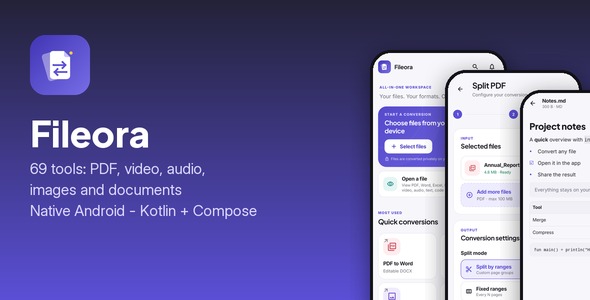
Fileora | File Converter Android App
Android only. Fileora runs on Android 8.0 (API 26) and later. No iOS version is included.
AI disclosure. AI tools were used to help create this item, including writing source code, drafting documentation, and writing the code that draws the logo and animations.
A complete, native Android app for converting, editing and viewing files.
Fileora is a ready-to-publish Android app written in Kotlin and Jetpack Compose. It bundles 69 file tools (PDF, Word, Excel, PowerPoint, images, video, audio, ZIP and more), an in-app viewer for the most common file types, a conversion queue with history, optional ads and in-app purchases, Firebase Analytics and Crashlytics, six languages (including right-to-left Arabic) and a polished, modern interface with light and dark themes.
File conversions run on the device without a server. Open the project in Android Studio to customise the app and connect your own accounts for any optional services you enable.
Third-party costs and revenue sharing. AdMob, Google Play Billing and Firebase are optional. Any applicable third-party fees, usage charges or revenue-sharing arrangements are separate from the CodeCanyon purchase price.
- Google Play Billing. Google Play service fees can apply to paid Premium purchases and subscriptions. Review Google Play’s service fees.
- AdMob. AdMob is free to use. Your ad earnings and payouts are governed by AdMob’s payment terms and thresholds.
- Firebase. Android Analytics and Crashlytics are available at no cost. Charges can apply if you enable paid Firebase or Google Cloud products in your project. Review Firebase pricing.
Open-source notice. MP3 output uses LAME and Alexey Kuznetsov’s android-lame wrapper. Fileora distributes both under LGPL 3.0 as separate, dynamically linked shared libraries. Corresponding source and rebuild instructions are included in third-party-source/lame/.
Try it on your phone: download the demo APK
Direct link: https://drive.google.com/file/d/1tI5yx36wK2wW3VqAMxQQEjRwDBaYwYsk/view?usp=sharing
- No login, account, e-mail or password is needed: install the APK and open it. (An Android app has no web live preview; the demo APK is the live preview.)
- Version 1.6.0, works on Android 8.0 and newer (API 26+). Signed release build with Google test ad IDs and no Firebase project, so nothing you do in the demo reaches the author. (Google’s own ads and ML Kit libraries inside the app may contact Google, see “Analytics, crash reports and ads” below.)
- Open the downloaded file and allow “Install unknown apps” for your browser or file manager when Android asks. If Play Protect shows a warning, choose “Install anyway”: the demo is signed with a test key, not a Google Play key.
- Ads in the demo are Google test ads and purchases are not connected to a store. Premium tools can be tried once per day each; unlocking them needs your own Google Play products.
- English transcription works offline on first use. The first Spanish transcription downloads a model of about 40 MB on the Processing screen. After setup, Spanish transcription works offline. Background Remover also downloads a model on first use.
- SHA-256 of the file:
55715037e9660b864073ead9727ba55b859d3be9be7fd183e067efbb33bc89ac
Open-source licence notice for LAME and android-lame
The Android Java/JNI wrapper (com.github.axet:lame:1.0.9) is by Alexey Kuznetsov (axet) and its Maven POM declares LGPL 3.0. Fileora selects LGPL 3.0 for the LGPL-covered LAME encoder (com.github.axet:liblame:3.100) under its upstream version-2-or-later permission. The upstream encoder POM lists LGPL 2.1. THIRD_PARTY_NOTICES.md records the version selection and attribution.
- Source availability.
third-party-source/lame/includes corresponding source and the LGPL 3 and GPL 3 texts. The LGPL 2.1 text is included for upstream reference. If you distribute an APK, provide the corresponding library source, licence texts, modifications, and build scripts with it or use another source-delivery method permitted by the licence. - Dynamic linking and replacement. The compiled demo APK contains separate
liblame.soandliblamejni.soshared objects for all five packaged architectures. The bridge’s ELFDT_NEEDEDentry namesliblame.so. The included rebuild guide covers compiling and substituting interface-compatible libraries, rebuilding and signing the app, and verifying the result. - Notices: keep the attribution and licence notice (the app has an Open-source licences screen and the package has THIRD_PARTY_NOTICES.md).
- Your rights: LAME and the Android wrapper retain their LGPL licences. Modification of these libraries and reverse engineering to debug those modifications are permitted as required by the LGPL. Buyers must preserve source availability and replacement rights when distributing their apps. The Envato licence applies to the author’s original work subject to these third-party rights.
- Want no LGPL duties at all? Removing MP3 output and the library is developer work (the documentation lists the places in the code); M4A and WAV output can stay.
What is included
- Complete Android Studio project (Kotlin, Jetpack Compose, Gradle Kotlin DSL) with clean, commented source code
- Illustrated HTML documentation (open Fileora-Documentation/index.html) with step-by-step Android Studio import, setup, customisation, AdMob, Google Play subscriptions, Firebase, languages, release signing and publishing, a complete copy-paste example for adding your own tool, the three common monetisation setups, upgrade notes, a pre-purchase FAQ, a field-by-field Data safety guide, console ID guides, an app-lock guide, step-by-step removal of tools, how to capture Google Play screenshots, indicative speed and size guidance for the heavy tools, logcat and support instructions, plus screenshots and troubleshooting
- Unit tests for the conversion engines, translations, viewer logic and monetisation rules
- A one-file configuration object (AppConfig.kt) for the things buyers change most
- Logo, adaptive and themed launcher icon, animated splash screen and Lottie animations
- Third-party licence notices ready to include in your product, plus an archived copy of the LGPL source of the MP3 encoder so you never depend on an outside repository
Tools
Documents: PDF to Word, Word to PDF, PowerPoint to PDF, Excel to PDF, PDF to text, Word to text, Image to Text (OCR, including scanned PDFs)
PDF: merge, split (by ranges, fixed ranges, or every page), reorder, delete and extract pages with page thumbnails, rotate, compress, sign, add or remove a password, watermark, page numbers, images to PDF (with camera scan), PDF to images, extract embedded images
Images: JPG, PNG and WebP converters, HEIC to JPG, compressor, resizer, cropper, upscaler (Lanczos resampling with sharpening), background remover, format optimizer, batch processing, rotate and flip, filters, remove metadata
Video: converter, compressor, trimmer with visual timeline, merger, crop, resize, speed and slow motion, reverse, mute, replace audio, burn subtitles, video to GIF, video to audio, intro maker, video and subtitle downloader (direct links)
Audio: converter, compressor, trimmer, merger, lossless audio extractor, noise cleaner, voice recorder, offline speech-to-text transcripts
Files and data: batch rename with patterns, numbering and live preview, ZIP create and extract, CSV, Excel and JSON converters, QR code generator, media info for video, audio, image and PDF files
In-app viewer and “Open with”
Open PDF, Word (.docx), Excel (.xlsx) and CSV, PowerPoint (.pptx), photos, video, audio, Markdown, plain text, source code (with syntax colouring and line numbers) and ZIP archives without leaving the app. The app also appears in the Android “Open with” list, so users can open files straight from their file manager.
Product features
- Background conversion with progress notification, queue with pause, cancel and reorder, searchable history with favourites
- Auto-save: finished files are copied to a chosen output folder and the result screen offers Open and Share
- System photo picker for photos and videos, an in-app audio library with preview for audio tools
- Visual editors: crop frame, PDF page grid, signature pad, trim timeline
- Six languages with a first-launch language picker: English, Spanish, French, German, Portuguese and Arabic (right-to-left). Adding a language is one JSON file
- Light, dark and system themes, premium typography, Lottie animations, animated splash screen
- Optional biometric app lock, share-to-app, storage insights and one-tap cleanup
- Google Play in-app updates and in-app review prompts
Monetisation (all switchable in one file)
- AdMob native ad cards on the main tabs, full-width banners on the tool screens, a full-screen interstitial after every successful conversion and app open ads (one switch on or off; Google test IDs included, you add your own)
- Google Play Billing: lifetime purchase plus monthly and yearly subscriptions with optional free trial, a paywall screen, a gold crown on Premium tools, daily free tries and a batch limit for free users, restore purchases and manage-subscription links
- You choose which tools are Premium by editing one list
- EU/UK consent: Google’s User Messaging Platform is built in, so the consent message you publish in your own AdMob account appears automatically and ads wait for the user’s choice. Test-device registration and the consent steps are explained in the documentation.
Analytics, crash reports and ads: what is included and what is not
- No author credentials are included. The package contains no google-services.json, no Firebase project and no keystore. The AdMob App ID and ad unit IDs in the code are Google’s public test IDs, which show test ads and earn nothing for anyone. Revenue and analytics can only reach the accounts you configure.
- Firebase is optional and uses your own project. Create a Firebase project, add your app and put your own
google-services.jsonin the app folder; Analytics and Crashlytics are then available and start collecting once the user switches sharing on in Settings. Without the file the app builds and runs normally and no analytics or crash data is sent. - Data Firebase collects when you enable it: app events (tool id, file count, duration, output size, a short error text, language, whether the user has Premium), Firebase’s automatic data (random app-instance ID, app version, device model, Android version, approximate country and city from the IP address) and Crashlytics crash and error reports (stack traces, device state, a random installation ID). File contents are never collected, and file names, paths and links are removed from error texts before they are sent. Sharing is off by default: nothing is sent until the user switches it on in Settings (set
TELEMETRY_DEFAULT_ON = trueto start with it on). A crash report holds Android’s own error text, which in rare cases can contain a file path, so mention crash reports in your privacy policy. - AdMob (when you enable ads and add your own IDs) collects the advertising ID, IP address and device information for ad delivery. Declare analytics, crash logs and advertising in your privacy policy and in the Google Play Data safety form. The documentation lists everything in a table.
- Google ML Kit (used by Image to Text, Background Remover and the camera scan) sends diagnostics (device model, OS and app version, a per-installation identifier, performance figures) to Google, independently of Firebase and ads; this is part of the Google library and cannot be switched off by the user. Declare it in your Google Play Data safety form (the documentation also explains how to remove all three ML Kit features if you want a “No data collected” answer); the documentation has a field-by-field table with links to Google’s own pages for Firebase, AdMob and ML Kit.
- A release build prints a warning if ads are on and the Google test IDs are still in place.
Technical details
- Kotlin 2.2, Jetpack Compose, Android Gradle Plugin 8.13, compile and target SDK 36, minimum Android 8.0 (API 26)
- Media3 Transformer for video, MediaCodec and LAME for audio, PdfBox-Android for PDF, ML Kit for OCR and background removal, Vosk for offline transcription, Lottie, Play Billing, AdMob, Firebase
- No Material library dependency: all components are custom and themed from a single file
- Package name and app name are easy to change (see documentation)
- Optional R8 code shrinking. The author tested a build with R8 enabled and the supplied rules on a physical Android device. R8 is off by default. If you enable it, test MP3 encoding, PDF processing and offline transcription first. Then regression-test all 69 tools and every enabled workflow on physical Android devices with the exact signed, minified release you plan to publish.
Please read before buying
- Built for Google Play. Billing, ads, the background remover and the camera scan need Google Play services. For other stores such as Huawei AppGallery or Amazon, the documentation has a checklist of what to switch off, remove or replace.
- The video and subtitle downloaders accept direct links to a media file. They do not extract videos from streaming websites, in line with site terms and Google Play policy.
- The image upscaler uses high-quality resampling with sharpening. It is not an AI upscaler.
- The background remover needs Google Play services and downloads a small model on first use. Transcription works offline for English; other languages download a speech model (about 40 MB) on first use.
- Speech and cut-out models: the English speech model (Vosk, Apache 2.0 licence, 41 MB) is bundled inside the app, so Transcribe works offline for English. Other languages download one small Vosk model (32 to 50 MB, Apache 2.0) the first time they are used, from alphacephei.com/vosk/models, and you can bundle more by dropping the zip into the assets folder (each adds about 40 MB; the documentation explains Google Play’s size limits and the alternatives). Background Remover uses the ML Kit subject-segmentation model, delivered by Google Play services under the ML Kit Terms of Service (Google offers no bundled version). The documentation lists the exact model names, sources, licences and attribution notes. Nothing is hosted by the author.
- Word, PowerPoint and Excel to PDF convert text and tables; they do not reproduce charts, images or exact fonts. The PowerPoint viewer shows slide titles and text only.
- The source ZIP includes a ready-to-install demo APK with Google test settings for ads and Premium. For your release, use your own signing key and configure AdMob IDs, Play Console products or a Firebase project for the integrations you enable.
- LAME MP3 encoder (LGPL): see “Open-source licence notice” above: dynamically linked and replaceable, the source is bundled, and nothing in the Envato licence restricts your LGPL rights. The documentation explains it step by step.
Support
Detailed documentation is included. Questions and bug reports are answered through the item support tab.
Download Now
LIVE PREVIEWDownload Now

