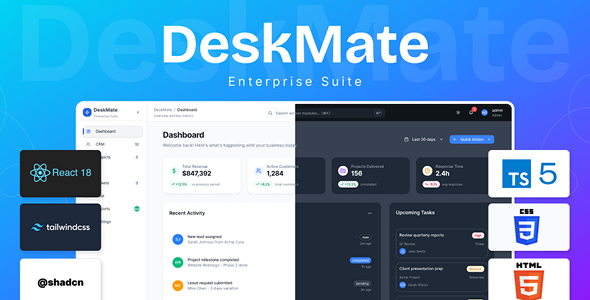
DESKMATE – ENTERPRISE SAAS PLATFORM
DeskMate is a production-ready React front-end for building an all-in-one SaaS platform, covering HR, CRM, projects, tickets, and team chat in a cohesive UI. It ships as a full client-side codebase (React + TypeScript + Tailwind + Vite) that you can plug into any modern backend.

CORE MODULES
DeskMate includes 8 fully-functional business management modules:
1. Dashboard – Real-time KPI monitoring with customizable widgets, activity feeds, performance charts, and quick action buttons for immediate access to business metrics.
2. CRM (Customer Relationship Management) – Complete customer lifecycle management featuring visual sales pipeline with drag-and-drop functionality, deal tracking, lead management, contact database, and conversion analytics.
3. Projects & Tasks – Flexible project management with multiple viewing options including interactive Kanban boards for agile workflows, Gantt charts for timeline visualization, task assignment, time tracking, and team collaboration tools.
4. HR Management – Comprehensive human resources module including employee directory with detailed profiles, real-time attendance tracking with check-in/out system, leave request and approval workflows, performance review system, and document management.
5. Support Tickets – Full-featured help desk system with multi-priority ticket management, status workflow tracking (Open → In Progress → Resolved → Closed), customer communication history, agent assignment, SLA tracking, and ticket analytics.
6. Team Chat – Internal communication platform with real-time messaging, public and private channels, direct messaging capabilities, file and media sharing, message search, @mentions, and notification system to replace external communication tools.
7. Reports & Analytics – Data-driven insights with customizable report builder, interactive charts and graphs, cross-module analytics, real-time KPI tracking, and export capabilities (CSV, PDF, Excel) for reporting and analysis.
8. Settings & Administration – Comprehensive system configuration panel with user and role management, security controls, notification preferences, appearance customization, system health monitoring, integration management, and audit logs.

KEY FEATURES & CAPABILITIES
40+ Pre-built UI Components – Complete library of Frontend-ready components including buttons, dialogs, tables, dropdowns, modals, cards, forms, and more – all fully customizable and accessible.
21+ Form Components – Comprehensive forms for all operations covering customer management, employee onboarding, project creation, leave requests, ticket creation, channel setup, and system configuration.
Advanced Search – Global search functionality with Command Palette (Cmd/Ctrl+K) for lightning-fast navigation and command execution across the entire application.
8 Comprehensive Appearance Settings – Professional theming system including theme mode (Light/Dark/System), custom color palette (HEX/RGB/HSL picker), layout density options, typography selection, shadow strength, corner radius customization, background tone presets, and real-time preview.
Responsive Design – Mobile-first architecture ensuring seamless experience across desktop, tablet, and mobile devices with adaptive layouts and touch-friendly interfaces.
Dark Mode Support – Complete dark theme implementation with real-time switching, persistent user preferences, and eye-friendly contrast ratios for extended use.
Real-time Notifications – Toast notification system providing instant user feedback for all actions with customizable message types and duration.
Data Export Capabilities – Export reports and data to CSV, PDF, and Excel formats for external analysis and sharing.
Keyboard Shortcuts – Power user features including keyboard navigation, hotkeys, and command palette for increased productivity.
Error Boundaries – Production-grade error handling preventing application crashes and providing user-friendly error messages.
Accessibility Compliant – WCAG 2.1 AA standard compliance ensuring inclusive design with proper ARIA labels, keyboard navigation, and color contrast ratios (4.5:1) meeting accessibility requirements for all users.
Type-Safe Development – Built entirely with TypeScript providing type safety, better IDE support, and reduced runtime errors.
Frontend-ready – 94% completion rate with enterprise-grade security, comprehensive testing, and optimization for performance and reliability.

TECHNOLOGY STACK
Frontend Framework:
– React 18.2.0 – Modern component-based UI library
– TypeScript 5.2.2 – Type-safe JavaScript for reliability
– Vite 5.0.8 – Lightning-fast build tool with Hot Module Replacement
Styling & UI Components:
– Tailwind CSS 4.0 – Utility-first CSS framework for rapid development
– shadcn/ui – High-quality React components built on Radix UI primitives
– Radix UI – Unstyled, accessible component primitives
– Lucide React – Beautiful icon library with 500+ icons
Data Visualization:
– Recharts 2.8.0 – Composable React charting library for analytics
Code Quality:
– ESLint – Static code analysis and error detection
– TypeScript Type Checking – Compile-time type safety
– Best-in-class patterns and architecture

SYSTEM REQUIREMENTS
Minimum Requirements:
– Node.js v18.0.0 or higher
– NPM v9.0.0 or higher
– 4GB RAM
– 500MB free disk space
– Modern web browser
Recommended Requirements:
– Node.js v20.0.0+ (LTS)
– NPM v10.0.0+
– 8GB RAM
– 1GB free disk space
Browser Support:
– Google Chrome 90+
– Mozilla Firefox 88+
– Apple Safari 14+
– Microsoft Edge 90+
WHAT’S INCLUDED
Complete Source Code
– Fully organized and documented component structure
– Feature-based module architecture for scalability
– Global styles with Tailwind CSS configuration
– Environment setup files and configuration
– Build and development scripts
Comprehensive Documentation
– Complete HTML installation guide for all operating systems
– Full user documentation with screenshots and descriptions
– Project structure reference guide for developers
– Development guidelines and best practices
– Troubleshooting checklist and FAQ
– Credits and third-party attributions
Design System & Assets
– 40+ ready-to-use UI components
– Customizable Tailwind CSS configuration
– 8 appearance settings with real-time preview
– Dark and light mode support with theme variables
– Icon library (Lucide React)
– Responsive design patterns
Live Working Demo
– Fully functional demonstration application
– Available at: https://deskmate-2025.web.app/
– Pre-populated with real data (not dummy content)
– All features accessible and testable
– Demo account credentials provided
Pre-built Form Components
– Customer/contact creation form
– Employee onboarding form
– New project creation form
– Leave request submission form
– Support ticket creation form
– New channel creation form
– And 15+ additional form templates
CUSTOMIZATION & BRANDING
The application features an advanced customization system allowing non-technical users to personalize the platform:
Theme Mode – Switch between Light, Dark, or System-sync modes with persistent user preferences
Color Palette – Choose from preset color schemes or use advanced HEX/RGB/HSL color picker for custom branding
Layout Density – Select Default, Compact, or Comfortable spacing to match workflow preferences
Typography – Choose from Inter, Roboto, System font, or Monospace, with custom font support
Border Radius – Customize corner roundness from Sharp (0px) to Very Rounded (16px)
Shadow Strength – Control element elevation with None to Strong shadow presets
Background Tone – Select from Warm, Cool, or Neutral background color schemes
Real-time Preview – See all changes instantly as you customize the interface
All settings are stored in browser localStorage and sync across sessions using CSS variables for immediate application.

INSTALLATION & SETUP
Quick Start (3 minutes):
1. Extract the ZIP file to your desired location
2. Open terminal/command prompt in the extracted folder
3. Run: `npm install` (installs dependencies)
4. Run: `npm run dev` (starts development server)
5. Open: http://localhost:5173 in your browser
Platform-Specific Instructions Included:
Windows:
– Extract ZIP file
– Right-click in folder → Open PowerShell here
– Run npm commands above
macOS:
– Extract ZIP file
– Open Terminal
– Navigate to Source folder: `cd path/to/source`
– Run npm commands above
Linux:
– Extract ZIP file
– Open Terminal
– Navigate to Source folder and run npm commands
– Complete NodeSource setup included if needed
Production Build:
– Run: `npm run build` to create optimized production build
– Generates `dist/` folder with minified assets ready for deployment
DEPLOYMENT OPTIONS
Deploy DeskMate to your preferred hosting platform:
Firebase Hosting (Recommended)
– Zero-config Firebase integration included
– Automatic HTTPS and CDN
– Simple deployment: `firebase deploy`
– Free tier available
Vercel (Easiest)
– Connect GitHub repository
– One-click deployment
– Automatic previews and rollbacks
– Optimized for Next.js/React
Netlify
– Drag-and-drop deployment
– GitHub integration
– Form handling and redirects
Traditional Hosting
– Any server supporting Node.js
– Docker containerization ready
– Environment-based configuration
SECURITY & ENTERPRISE FEATURES
Authentication & Access Control:
– Role-Based Access Control (RBAC) framework
– Two-Factor Authentication (2FA) ready
– Secure session management
– User permission management
Data Protection:
– Input validation on all forms
– XSS (Cross-Site Scripting) protection
– Environment variable protection (no secrets in code)
– Secure API key management system
Audit & Compliance:
– Comprehensive audit logs tracking all system actions
– Admin activity monitoring
– Data export and backup capabilities
– WCAG 2.1 AA accessibility compliance
Code Security:
– TypeScript type safety preventing runtime errors
– Dependency security scanning (npm audit)
– No malware or security vulnerabilities
– Regular security updates and patches
SUPPORT & DOCUMENTATION
Comprehensive Help Resources Included:
– Step-by-step installation guide (HTML + Markdown)
– Complete user documentation with screenshots
– Component and module reference guide
– Project structure documentation for developers
– Troubleshooting guide covering common issues
– Frequently asked questions (FAQ)
Technical Support:
– Support email: contact.uicodes@gmail.com
– Responsive assistance for implementation questions
– Regular updates and maintenance
USE CASES & TARGET USERS
Perfect for:
– Web developers building SaaS applications
– Agencies creating business management platforms
– Developers learning advanced React and modern web patterns
– Teams needing a quick SaaS application starter
– Entrepreneurs launching business software
– Consultants implementing CRM/HR solutions
– Companies needing an all-in-one business platform
WHY CHOOSE DESKMATE?
✅ All-in-One Solution – Replace 5+ different tools with one unified platform, reducing tool switching and improving team collaboration
✅ Modern Technology Stack – Built with React 18, TypeScript 5, Tailwind CSS 4, and Vite 5 using latest web standards and best practices
✅ Highly Customizable – Extensive 8-setting appearance system allows users to brand and customize without touching code
✅ Well Documented – Comprehensive documentation, guides, and support ensure smooth implementation and usage
✅ Enterprise Grade – Security-first design, accessibility compliance, performance optimization, and scalable architecture
✅ Active Support – Quick response to questions and regular updates keep the platform current and reliable
✅ Proven Architecture – Based on proven patterns from Linear, Notion, and Monday.com
✅ Developer Friendly – Clean code, TypeScript types, component library, and detailed project structure make customization easy
✅ Scalable – Modular design allows for feature additions and customization as business needs grow
Important: * This item is a front-end application/template only. It does not include backend/server code, database schema, or authentication logic. You will need to integrate it with your own backend or API to make it a fully working SaaS product.DEMO ACCESS
Live Demo:* https://deskmate-2025.web.app/
Email: admin@deskmate.com
Password: admin123
Test all features including dashboard, CRM, projects, HR, tickets, chat, reports, and settings with pre-populated real data.
TECHNICAL SUPPORT
For technical questions, feature requests, or support:
Email: contact.uicodes@gmail.com
DeskMate v1.0 | Frontend-ready Enterprise SaaS Platform | Built with React, TypeScript, and Tailwind CSS
Download Now
LIVE PREVIEWDownload Now