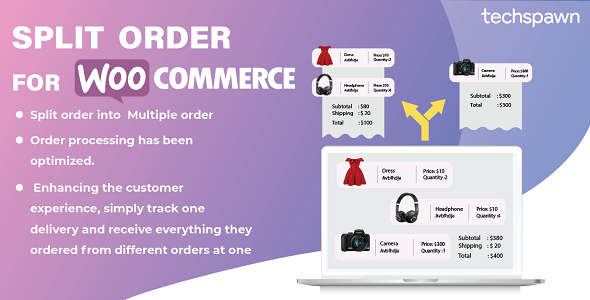
StockUpp Split Order For WooCommerce allows splitting an order into separate orders based on various conditions. It splits an order automatically into multiple orders based on the category, product availability, and location of the products in the cart. The customer will receive different order ids for their ordered products.
Compatible with: WordPress 6.5 to 7.1, WooCommerce 8.2 to 11.2, PHP 7.4 or later. Supports HPOS and Cart/Checkout Blocks.
FEATURES OF PLUGIN
Woocommerce Spit Order Plugin Automatically Splits orders if based on condition/ Rule setup in backend. As of now, plugin supports Category, Products, Location, and Stock Status to Split orders.
Split Woocommerce Order according to category:
With the help of this plugin, the admin can easily split order as per the category of the product and process every product individually.
Split Woocommerce Order according to Products:
With the help of this plugin, the admin can easily split order for each product and process every product individually.
Split Order for In stock and backorder Products separately
As the Plugin separates the in-stock and out stock products, it becomes easy for the admin to manage the items which are in-stock and which are out of stock separately.
Split Woocommerce Order based on Location:
This plugin is compatible with WooCommerce Multi Locations Inventory Management plugin by techspawn and Splits products on each location separately in different orders.

✔ Separate order ids are created based on selected conditions and attribute
✔ Separate invoices and shipment can be created for individual order
✔ The customer can view detailed information about their order in their account
✔ The customer would get the details of each order Id generated in the orders section of my account.
Split Orders Manually
Admin can use Split Button on order page in the backend to split woocommerce orders manually as well.


Have any Question?
Feel free to ask our Support if you looking for any additional features Or have Pre-Sale Question for Distance Rate Shipping for WooCommerce Plugin
For Free configuration support, email support@techspawn.com
Read more about us at: www.techspawn.com



Changelog
= 1.1.1 =
Fix - On stores using High-Performance Order Storage (HPOS), orders split by earlier versions keep their parent and child links, split flags and stock markers after the upgrade; they are copied once, without overwriting newer data.
Fix - A parent whose child orders were trashed, or whose only record is the child's link to it, is still recognised as split, so it cannot be split a second time.
Fix - If the saved links cannot be checked, splitting stops with a retry message instead of creating a second set of orders.

= 1.1.0 =
Add - A shared, repeat-safe WooCommerce CRUD split engine for checkout, manual order splitting and bulk actions, with HPOS and Cart/Checkout Blocks support.
Add - Shipping, fees, coupon discounts and saved taxes are shared across child orders without changing the original order total.
Add - A configurable “Your order was split” customer email in WooCommerce Settings > Emails.
Add - Links between original and child orders on the thank-you page, in My Account and in the order editor.
Add - Split rules for shipping class, product tag and Dokan/WCFM vendor, with an “Only split when” condition for automatic and bulk rules.
Add - Separate per-line and per-unit split modes, while retaining category, product, stock status, quantity and Multi-Locations Inventory location rules.
Fix - Split parent orders now retain the original payment receipt in a dedicated Split status excluded from WooCommerce Analytics, preventing duplicate revenue.
Fix - Splitting transfers stock ownership to child orders, so original units are not deducted or restored twice.
Fix - Payment cancellation during split creation prevents fulfillment, restores stock and releases coupon usage once; interrupted activation can be resumed from the order actions menu.
Fix - Interrupted cancellation verifies stock restoration and lets the merchant finish outstanding stock work without repeating order status events.
Fix - Activation verifies outstanding stock deductions before completing; interrupted coupon releases and failed-creation cancellation can recover safely.
Fix - Initial child notifications stay suppressed with deferred WooCommerce email delivery, while later fulfillment notifications remain enabled.
Fix - Split notifications no longer enable the merchant's disabled New Order emails.
Note - Splitting waits for Processing, Completed or On hold status. Refund allocations on the child orders and return funds through the original payment gateway dashboard.

= 1.0.14 =
Security - Splitting an order from the order screen now requires a valid security token and permission to edit orders.
Security - Removed an unused AJAX action that let any logged-in user split and delete orders.
Security - Escaped output on the thank-you page, the settings page and the split popup.
Add - Compatibility with WooCommerce High-Performance Order Storage (HPOS).
Add - Compatibility with the WooCommerce Cart and Checkout blocks: split orders now get the customer's addresses, note and payment method.
Fix - Paid orders were set to "Pending payment" when the customer opened the thank-you page.
Fix - Fatal error on WooCommerce > Settings > Emails.
Fix - The "Per Line Item Quantity" rule did not split orders.
Fix - Split orders had no shipping address when the customer did not tick "Ship to a different address".
Fix - Orders split from the order screen are now assigned to the order's customer, and the parent order's line total is updated.
Fix - Splitting from the order screen now keeps the prices and taxes the customer paid (including discounts) on both orders, checks quantities against the saved order, and rejects a repeated or out-of-date split request (for example from a second tab).
Fix - Splitting from the order screen moved the wrong line when an order had several variations of one product or the same product on two lines.
Fix - Two people splitting the same order at the same time can no longer move the same units twice.
Fix - With the "Per Line Item Quantity" rule, split orders now keep the coupon discount the customer received.
Fix - Per-unit split orders preserve paid line totals and taxes when amounts do not divide evenly, including currencies with zero or three decimal places.
Fix - Manual split orders retain the parent order's currency when it differs from the current store currency.
Fix - Per-unit split taxes reconcile per rate when tax is rounded at subtotal level across several product lines.
Fix - Parent status notifications are sent after split children are saved, including with legacy order storage.
Fix - Manual split orders store their parent and child links for split details and notifications.
Fix - Per-unit split children retain variation identity and use the correct managed stock product.
Fix - Pending split children no longer increase inventory without a recorded stock deduction; stock compensation runs once per deduction.
Fix - Cancelling or refunding automatic split orders restores each deducted unit only once, including after reactivation.
Fix - Saving an automatic split child in the order editor adjusts stock only for quantities added beyond the original split.
Fix - Products added to an existing split child keep their own stock deduction across repeated order saves.
Fix - Reducing a refunded split child to its original quantity leaves a nonnegative stock balance.
Fix - Manual splits preserve saved negative-fee discounts and their taxes across both orders.
Fix - Manual splits transfer stock ownership so moved units are not deducted again or restored twice.
Fix - Fully moving a line with fractional tax preserves the paid tax budget and leaves the parent totals stable on recalculation.
Fix - Split order totals on the thank-you page were rounded down.
Fix - PHP 8 warnings and product property notices.
Fix - Admin scripts now load only on the plugin settings page and the order edit screen.
Fix - Plugin name in the Plugins list.
Compatibility - WordPress 7.1, WooCommerce 11.2 and PHP 7.4 to 8.5.

= 1.1.0 =
Add - A shared, repeat-safe WooCommerce CRUD split engine for checkout, manual order splitting and bulk actions, with HPOS and Cart/Checkout Blocks support.
Add - Shipping, fees, coupon discounts and saved taxes are shared across child orders without changing the original order total.
Add - A configurable “Your order was split” customer email in WooCommerce Settings > Emails.
Add - Links between original and child orders on the thank-you page, in My Account and in the order editor.
Add - Split rules for shipping class, product tag and Dokan/WCFM vendor, with an “Only split when” condition for automatic and bulk rules.
Add - Separate per-line and per-unit split modes, while retaining category, product, stock status, quantity and Multi-Locations Inventory location rules.
Fix - Split parent orders now retain the original payment receipt in a dedicated Split status excluded from WooCommerce Analytics, preventing duplicate revenue.
Fix - Splitting transfers stock ownership to child orders, so original units are not deducted or restored twice.
Fix - Payment cancellation during split creation prevents fulfillment, restores stock and releases coupon usage once; interrupted activation can be resumed from the order actions menu.
Fix - Interrupted cancellation verifies stock restoration and lets the merchant finish outstanding stock work without repeating order status events.
Fix - Activation verifies outstanding stock deductions before completing; interrupted coupon releases and failed-creation cancellation can recover safely.
Fix - Initial child notifications stay suppressed with deferred WooCommerce email delivery, while later fulfillment notifications remain enabled.
Fix - Split notifications no longer enable the merchant's disabled New Order emails.
Note - Splitting waits for Processing, Completed or On hold status. Refund allocations on the child orders and return funds through the original payment gateway dashboard.

= 1.0.14 =
Security - Splitting an order from the order screen now requires a valid security token and permission to edit orders.
Security - Removed an unused AJAX action that let any logged-in user split and delete orders.
Security - Escaped output on the thank-you page, the settings page and the split popup.
Add - Compatibility with WooCommerce High-Performance Order Storage (HPOS).
Add - Compatibility with the WooCommerce Cart and Checkout blocks: split orders now get the customer's addresses, note and payment method.
Fix - Paid orders were set to "Pending payment" when the customer opened the thank-you page.
Fix - Fatal error on WooCommerce > Settings > Emails.
Fix - The "Per Line Item Quantity" rule did not split orders.
Fix - Split orders had no shipping address when the customer did not tick "Ship to a different address".
Fix - Orders split from the order screen are now assigned to the order's customer, and the parent order's line total is updated.
Fix - Splitting from the order screen now keeps the prices and taxes the customer paid (including discounts) on both orders, checks quantities against the saved order, and rejects a repeated or out-of-date split request (for example from a second tab).
Fix - Splitting from the order screen moved the wrong line when an order had several variations of one product or the same product on two lines.
Fix - Two people splitting the same order at the same time can no longer move the same units twice.
Fix - With the "Per Line Item Quantity" rule, split orders now keep the coupon discount the customer received.
Fix - Per-unit split orders preserve paid line totals and taxes when amounts do not divide evenly, including currencies with zero or three decimal places.
Fix - Manual split orders retain the parent order's currency when it differs from the current store currency.
Fix - Per-unit split taxes reconcile per rate when tax is rounded at subtotal level across several product lines.
Fix - Parent status notifications are sent after split children are saved, including with legacy order storage.
Fix - Manual split orders store their parent and child links for split details and notifications.
Fix - Per-unit split children retain variation identity and use the correct managed stock product.
Fix - Pending split children no longer increase inventory without a recorded stock deduction; stock compensation runs once per deduction.
Fix - Cancelling or refunding automatic split orders restores each deducted unit only once, including after reactivation.
Fix - Saving an automatic split child in the order editor adjusts stock only for quantities added beyond the original split.
Fix - Products added to an existing split child keep their own stock deduction across repeated order saves.
Fix - Reducing a refunded split child to its original quantity leaves a nonnegative stock balance.
Fix - Manual splits preserve saved negative-fee discounts and their taxes across both orders.
Fix - Manual splits transfer stock ownership so moved units are not deducted again or restored twice.
Fix - Fully moving a line with fractional tax preserves the paid tax budget and leaves the parent totals stable on recalculation.
Fix - Split order totals on the thank-you page were rounded down.
Fix - PHP 8 warnings and product property notices.
Fix - Admin scripts now load only on the plugin settings page and the order edit screen.
Fix - Plugin name in the Plugins list.
Compatibility - WordPress 7.1, WooCommerce 11.2 and PHP 7.4 to 8.5.

 = 1.0.13 =
[New] Compatibility with Multiloca: Multilocation Inventory Plugin
[Fix] The parent order status does not change when set to cancel.
[Fix] Customer Unable to View Split Orders Due to Guest User Assignment

= 1.0.10 =
[Fix] SKU is not being added to the suborder for variable products

= 1.0.9 =
[Fix] Adding SKU for variable product in suborders

= 1.0.7 =
[Add] - Split order only if quantity is more than one.

= 1.0.6 =
[New] Rule per line item parameter

= 1.0.4 =
[Fix] The status of the selected split order is not visible on the all orders page.

= 1.0.2 =
[Fix] validation for frontend split order on limit 1 product
[Fix] Validation for popup split order [Backend]

= Version 1.0.1 =
[Add] Option to cancel or delete the parent order.

= Version 1.0.0 =
Initial Release
Download Now
LIVE PREVIEWDownload Now